Human + product / 02:07 / Published 2025-07-17
Introducing ChatGPT agent
Interview coverage and physical laptop shots surround short, highly cropped software examples. Compact browser activity cards lead to concrete files and tables. This is a contrast to the product-only films, not the default layout for a separate presentation video.
Useful to borrow
Use task → visible activity → artifact as a story spine. Show a source document or browser action before the result file.
Do not infer
Do not add these interview subjects or another presenter inset to the companion video; the user's talking head already runs separately in OBS.
25 shot groups.
Read across from the observed content to its treatment and possible adaptation. Enlarge the frame for detail.
Approximate study intervals; horizontal scrolling reveals all columns on small screens.
| Moment / source | Reference frame | What is on screen | Framing / edit | Useful adaptation |
|---|---|---|---|---|
| Shot group 01 ≈ 00:00–00:04 People / environmentWatch from here ↗ | Sample 00:02.000 | Environment An exterior garden establishes a place. | Wide live-action opening. | An environment shot is optional context, not a necessary preamble. |
| Shot group 02 ≈ 00:04–00:11 People / environmentWatch from here ↗ | Sample 00:08.000 | Interview A seated speaker appears in wide and tighter coverage. | Interview angle changes. | A contrast example; omit a second talking head in this project. |
| Shot group 03 ≈ 00:11–00:15 App / browser screenWatch from here ↗ | Sample 00:12.000 | Composer / tools The tool menu exposes the agent choice, then the selected state. | Isolated centered composer. | Show entry into a mode before its results. |
| Shot group 04 ≈ 00:15–00:21 Title / identityWatch from here ↗ | Sample 00:18.000 | Opening card Typography surrounds a small abstract animated insert. | Large title with a colored inset. | A short visual reset can introduce a major subject. |
| Shot group 05 ≈ 00:21–00:33 People / environmentWatch from here ↗ | Sample 00:28.000 | Interview Several interview angles continue the introduction. | Multiple people and shot sizes. | Study pacing only; do not import the people footage. |
| Shot group 06 ≈ 00:33–00:37 People / environmentWatch from here ↗ | Sample 00:36.000 | Physical laptop Hands open and operate a laptop. | Tactile close-up inserts. | A brief physical action can motivate a screen cut when relevant. |
| Shot group 07 ≈ 00:37–00:41 App / browser screenWatch from here ↗ | Sample 00:40.000 | Composer / send A multi-step task ends on a very tight send-control crop. | Prompt establishment into button detail. | Emphasize the moment a task starts. |
| Shot group 08 ≈ 00:41–00:44 People / environmentWatch from here ↗ | Sample 00:44.000 | Interview The film briefly returns to its speaker. | Wide seated coverage. | In all-hands, the separate OBS video provides this presence. |
| Shot group 09 ≈ 00:44–00:50 App / browser screenWatch from here ↗ | Sample 00:48.000 | Composer Different task requests appear in quick succession. | Prompt montage with brief physical inserts. | Use a montage only to show breadth, not teach every task. |
| Shot group 10 ≈ 00:50–00:51 People / environmentWatch from here ↗ | Sample 00:50.000 | Physical laptop A keyboard insert punctuates the requests. | Tight hands shot. | Avoid decorative cutaways that compete with explanation. |
| Shot group 11 ≈ 00:51–00:55 App / browser screenWatch from here ↗ | Sample 00:54.000 | Composer / send Another task is entered and the send button fills the crop. | Prompt-to-control framing. | A consistent submit motif connects otherwise different tasks. |
| Shot group 12 ≈ 00:55–00:59 People / environmentWatch from here ↗ | Sample 00:58.000 | Physical laptop A laptop closes and a person stands. | Short action montage. | Suggest offloaded work without pretending actual elapsed time. |
| Shot group 13 ≈ 00:59–01:05 App / browser screenWatch from here ↗ | Sample 01:02.000 | Agent browser A compact live-browser card searches and opens restaurant pages. | Centered activity window with visible task label. | Keep progress legible without making it the whole screen. |
| Shot group 14 ≈ 01:05–01:07 App / browser screenWatch from here ↗ | Sample 01:06.000 | Agent activity A status card describes information gathering. | Isolated activity text. | Use authentic activity evidence rather than generic particles. |
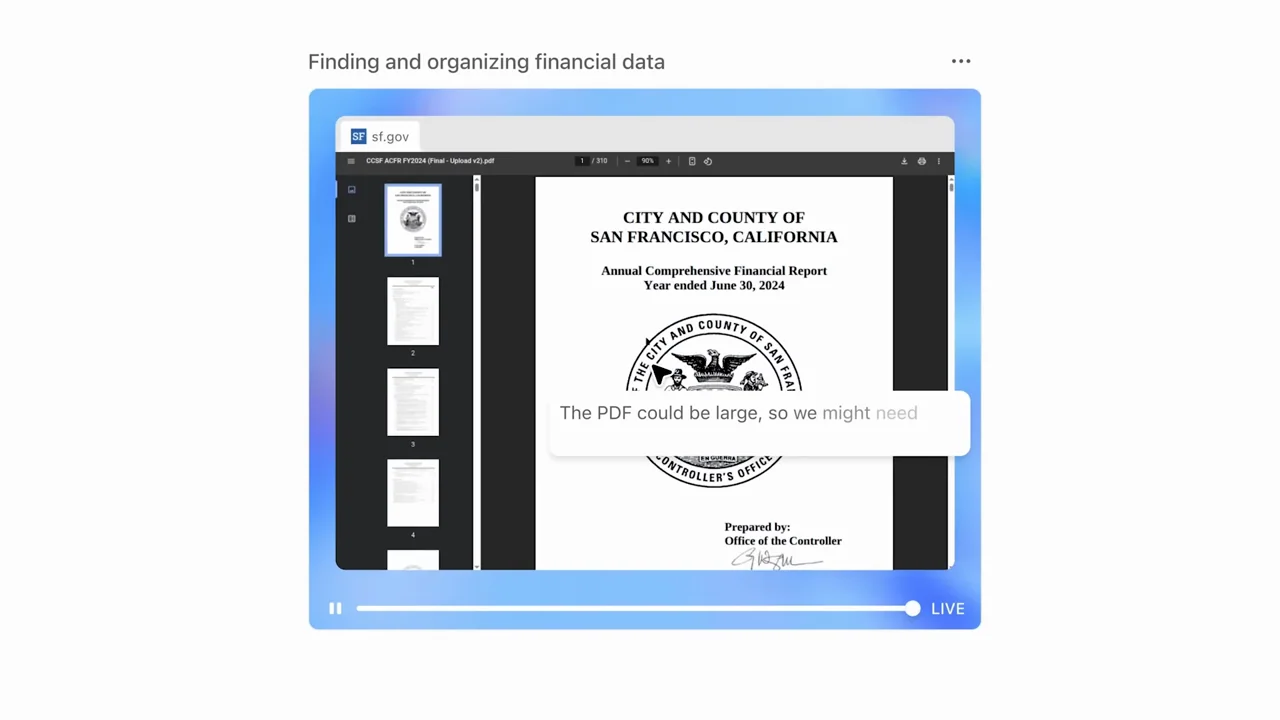
| Shot group 15 ≈ 01:07–01:13 App / browser screenWatch from here ↗ | Sample 01:10.000 | PDF / source viewer A financial PDF appears inside the agent's browser view. | Compact document viewer with a task overlay. | Show the source material behind a claim. |
| Shot group 16 ≈ 01:13–01:17 App / browser screenWatch from here ↗ | Sample 01:16.000 | Agent browser A travel task uses a compact browser/activity card. | The same card grammar carries a new subject. | Reuse framing, not identical content. |
| Shot group 17 ≈ 01:17–01:22 App / browser screenWatch from here ↗ | Sample 01:20.000 | Presentation output A presentation attachment opens into a slide preview. | Attachment detail then a larger document surface. | Make the handoff from activity to artifact visible. |
| Shot group 18 ≈ 01:22–01:27 App / browser screenWatch from here ↗ | Sample 01:24.000 | Agent browser A travel search page appears with an action overlay. | Centered browser activity and short task text. | Show the relevant action and omit idle browsing. |
| Shot group 19 ≈ 01:27–01:31 App / browser screenWatch from here ↗ | Sample 01:30.000 | Connected-app activity An activity card includes a calendar connection state. | Compact status composition. | Distinguish connected-tool state from final success. |
| Shot group 20 ≈ 01:31–01:39 People / environmentWatch from here ↗ | Sample 01:36.000 | Environment / laptop Wide room coverage returns to close laptop use. | Multiple live-action cuts. | Useful contrast, not footage to reuse. |
| Shot group 21 ≈ 01:39–01:41 App / browser screenWatch from here ↗ | Sample 01:40.000 | Answer A completed written response fills a close crop. | Result text isolated on white. | Hold the useful answer, not the entire chat history. |
| Shot group 22 ≈ 01:41–01:43 People / environmentWatch from here ↗ | Sample 01:42.000 | Interview A speaker reacts between result examples. | Medium close-up. | The user's recorded expression already supplies this beat. |
| Shot group 23 ≈ 01:43–01:51 Isolated outputWatch from here ↗ | Sample 01:48.000 | Slides / spreadsheet A slide and spreadsheet results appear in successive crops. | Output montage; little or no app chrome. | Use proof artifacts, but do not call them application UI. |
| Shot group 24 ≈ 01:51–02:01 People / environmentWatch from here ↗ | Sample 01:58.000 | Interview / laptop Hands and faces close the human story. | Short live-action montage. | Do not duplicate the separate talking-head finish. |
| Shot group 25 ≈ 02:01–02:07 Title / identityWatch from here ↗ | Sample 02:06.000 | End card The film ends on source identity. | White type and mark. | Reserve a clear presentation end before the OBS buffer. |