Presenter demo / 01:35 / Published 2026-08-06
Introducing Agent Plugins
A presenter-led explanation switches to a dark specification page and code editor. Selected JSON blocks carry the technical emphasis.
Useful to borrow
Use readable code selection to mark the changed fields, and separate a specification overview from an implementation example.
Do not infer
Most of the opening and ending is a presenter, not a product demo. The inset presenter and partner branding are not assets for the silent companion video.
Look closer
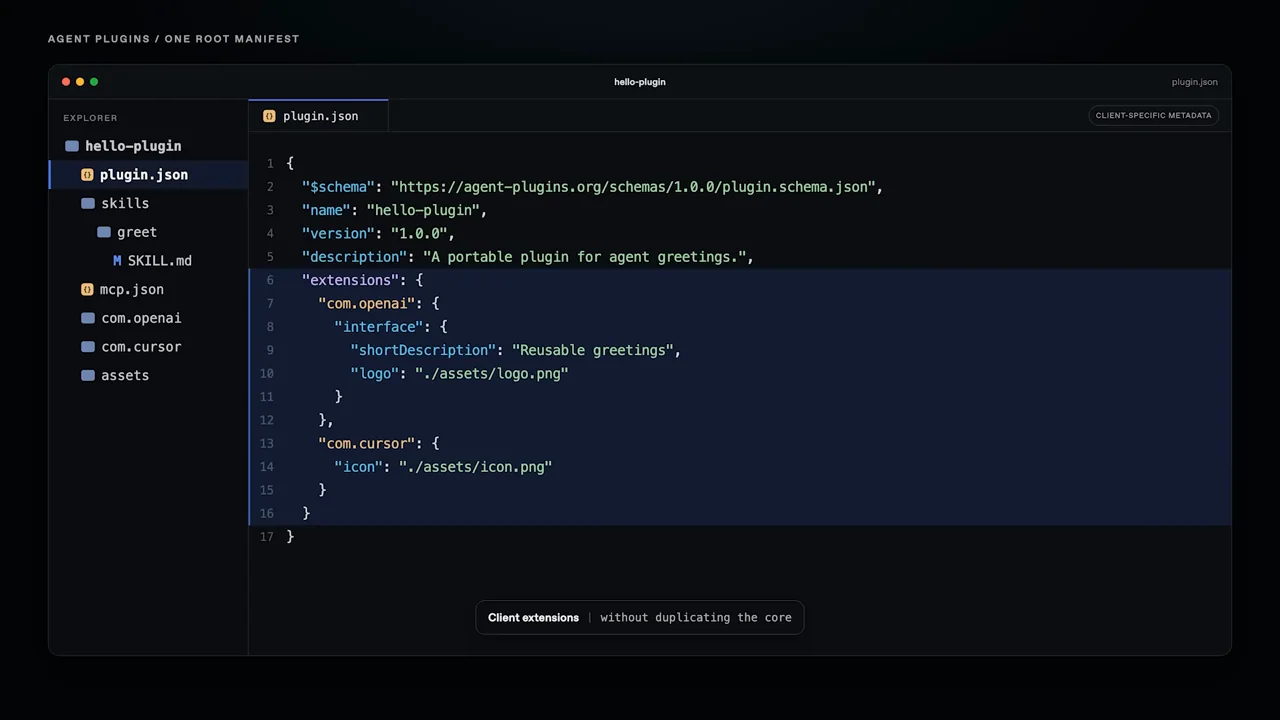
- Let the selected code carry the emphasis · 01:10–01:16
18 shot groups.
Read across from the observed content to its treatment and possible adaptation. Enlarge the frame for detail.
Approximate study intervals; horizontal scrolling reveals all columns on small screens.
| Moment / source | Reference frame | What is on screen | Framing / edit | Useful adaptation |
|---|---|---|---|---|
| Shot group 01 ≈ 00:00–00:04 People / environmentWatch from here ↗ | Sample 00:02.000 | Laptop opening A close laptop shot carries an overlaid topic title. | Physical object foreground; lower-left title. | A brief contextual opening can precede technical detail. |
| Shot group 02 ≈ 00:04–00:08 People / environmentWatch from here ↗ | Sample 00:06.000 | Presenter establishment The speaker appears behind a laptop with a lower-third label. | Wide, centered desk composition. | Keep this role in the separate talking-head asset. |
| Shot group 03 ≈ 00:08–00:14 People / environmentWatch from here ↗ | Sample 00:10.000 | Presenter close-up A closer angled view replaces the wide shot. | Direct cut changes scale while preserving location. | Borrow the scale change, not an extra presenter inset. |
| Shot group 04 ≈ 00:14–00:20 People / environmentWatch from here ↗ | Sample 00:16.000 | Presenter return The wider desk framing returns before the technical chapter. | Re-establishing wide shot. | Prepare a clear transition from explanation to evidence. |
| Shot group 05 ≈ 00:20–00:22 Title / identityWatch from here ↗ | Sample 00:20.000 | Specification introduction A short monospaced statement appears on black. | Sparse technical chapter card. | Introduce a technical concept with one readable line. |
| Shot group 06 ≈ 00:22–00:29 Graphic interludeWatch from here ↗ | Sample 00:24.000 | Partner marks A row of supporting organization marks occupies the black field. | Evenly spaced logo strip. | Use real project participants only when relevant and permitted. |
| Shot group 07 ≈ 00:29–00:32 Title / identityWatch from here ↗ | Sample 00:30.000 | Plugin identity A large topic label and small category labels appear. | Centered heading with supporting metadata. | Make the chapter name readable before the documentation view. |
| Shot group 08 ≈ 00:32–00:38 App / browser screenWatch from here ↗ | Sample 00:34.000 | Specification website A dark documentation page shows navigation, prose, and a package code example. | Whole-page establishment followed by a closer reading crop. | Show where a code sample belongs before enlarging it. |
| Shot group 09 ≈ 00:38–00:42 App / browser screenWatch from here ↗ | Sample 00:40.000 | Code editor / package An editor displays a small plugin package and its manifest. | Dark editor with a lower-right presenter inset. | Use the file tree to establish the artifact being edited. |
| Shot group 10 ≈ 00:42–00:46 App / browser screenWatch from here ↗ | Sample 00:42.000 | Manifest selection The manifest name line is highlighted while the file tree remains visible. | Native selection supplies the emphasis. | Point to the changed field rather than adding decorative arrows. |
| Shot group 11 ≈ 00:46–00:52 App / browser screenWatch from here ↗ | Sample 00:48.000 | Skill folder A skills folder and its file become visible beside the manifest. | Stable editor framing; structural context changes. | Show the relationship between configuration and its supporting file. |
| Shot group 12 ≈ 00:52–01:02 People / environmentWatch from here ↗ | Sample 00:56.000 | Presenter explanation The film returns to the desk speaker. | Longer continuous explanation beat. | Let the talking head carry this material without redundant screen action. |
| Shot group 13 ≈ 01:02–01:10 App / browser screenWatch from here ↗ | Sample 01:06.000 | Manifest metadata The editor returns without the inset and shows additional manifest fields. | More screen area devoted to the technical artifact. | Remove nonessential overlays for dense material. |
| Shot group 14 ≈ 01:10–01:14 App / browser screenWatch from here ↗ | Sample 01:12.000 | Client configuration A larger block of client configuration is selected. | Blue selection against a dark editor. | Keep the selected block short enough to read. |
| Shot group 15 ≈ 01:14–01:20 App / browser screenWatch from here ↗ | Sample 01:16.000 | Configuration expansion A broader configuration block and additional supporting folders are visible. | Same editor holds through the changed structure. | Demonstrate growth in the artifact without an unrelated transition. |
| Shot group 16 ≈ 01:20–01:26 People / environmentWatch from here ↗ | Sample 01:22.000 | Presenter conclusion Wide and close presenter views resume. | Alternating scales within the same set. | Reserve the spoken conclusion for the supplied recording. |
| Shot group 17 ≈ 01:26–01:31 People / environmentWatch from here ↗ | Sample 01:28.000 | Presenter closing hold The wide desk shot carries the final explanation. | Stable closing composition. | Allow a clear spoken finish before the final visual card. |
| Shot group 18 ≈ 01:31–01:35 Title / identityWatch from here ↗ | Sample 01:34.000 | End destination A white identity card resolves to a destination line. | Minimal brand ending. | Use an original project destination rather than source branding. |