Product film / 01:37 / Published 2025-10-21
Introducing ChatGPT Atlas
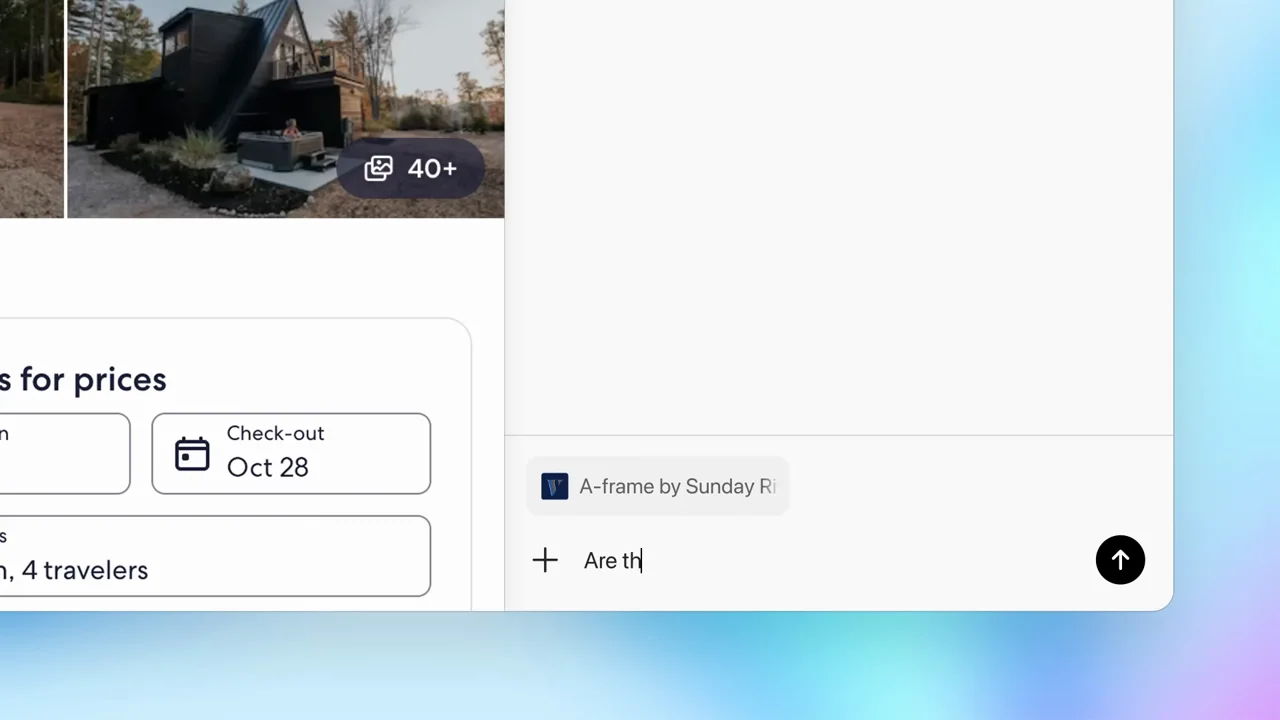
A repeatable product-film structure: short white chapter cards, a recognizable browser window, then tightly cropped evidence of one action. The shopping sequence stays with a single task through permission, activity, and a visible cart.
Useful to borrow
Establish the whole window before cropping to a control. Use the same crop across related examples. Close a demo on its result, not its loading state.
Do not infer
Do not transplant the blue desktop, Atlas branding, shopping data, or implied agent capabilities into your product. The very tight crops depend on viewers having already seen the browser.
Look closer
- A dock contracts into one identity · 00:00–00:03
- Reveal the browser around a persistent composer · 00:07–00:13
- Keep selection, handles, and assistant on one line · 00:44–00:50
- Widen before demonstrating autonomous activity · 01:12–01:16
- Type, hold, replace, then resolve the icon · 01:27–01:32
- A chapter card is a cut, not a slide deck · 00:16–00:20
- Sometimes the right zoom is a hard cut · 00:22–00:24
24 shot groups.
Read across from the observed content to its treatment and possible adaptation. Enlarge the frame for detail.
Approximate study intervals; horizontal scrolling reveals all columns on small screens.
| Moment / source | Reference frame | What is on screen | Framing / edit | Useful adaptation |
|---|---|---|---|---|
| Shot group 01 ≈ 00:00–00:03 Graphic interludeWatch from here ↗ | Sample 00:02.000 | App identity A small desktop dock introduces the application icon. | Centered object on white; generous empty space. | A brief identity anchor before the demo. |
| Shot group 02 ≈ 00:03–00:07 Title / identityWatch from here ↗ | Sample 00:06.000 | Opening card The product name is revealed as a short statement. | Type appears on a white field. | Use a concise title as a manual-start lead-in. |
| Shot group 03 ≈ 00:07–00:14 App / browser screenWatch from here ↗ | Sample 00:12.000 | Browser start / composer A search field becomes a recognizable browser start screen. | Isolated control expands into window context. | Move from the task to its location in the product. |
| Shot group 04 ≈ 00:14–00:16 App / browser screenWatch from here ↗ | Sample 00:16.000 | Browser page A lodging website fills the framed browser. | Full-window establishment on a colored desktop. | Give viewers a spatial reference before the crop. |
| Shot group 05 ≈ 00:16–00:19 Title / identityWatch from here ↗ | Sample 00:18.000 | Chapter card A short statement separates the next capability. | White reset card; measured 3.0-second interval. | A recognizable content transition can be the OBS cue. |
| Shot group 06 ≈ 00:19–00:23 App / browser screenWatch from here ↗ | Sample 00:22.000 | Browser page A property listing establishes the page context. | Whole browser is visible before the sidebar detail. | Show what the assistant will act on. |
| Shot group 07 ≈ 00:23–00:27 App / browser screenWatch from here ↗ | Sample 00:26.000 | Browser + assistant A prompt is entered next to the property listing. | Verified hard cut into the sidebar crop. | Use a cut when a smooth zoom adds no information. |
| Shot group 08 ≈ 00:27–00:31 App / browser screenWatch from here ↗ | Sample 00:30.000 | Browser + assistant A question and answer stay beside the source page. | Close framing; context remains at the left edge. | Keep the relevant source visible with the answer. |
| Shot group 09 ≈ 00:31–00:35 App / browser screenWatch from here ↗ | Sample 00:34.000 | Browser + assistant Coursework and an article appear in successive contextual prompts. | Montage retains the same left-source/right-prompt arrangement. | Change the subject without changing the visual grammar. |
| Shot group 10 ≈ 00:35–00:41 App / browser screenWatch from here ↗ | Sample 00:40.000 | Browser + assistant A flight page is paired with a question and response. | Same tight split-screen composition. | End a short example on an answer the audience can recognize. |
| Shot group 11 ≈ 00:41–00:45 Title / identityWatch from here ↗ | Sample 00:44.000 | Chapter card A short assistance statement resets the screen. | Centered type; no product chrome. | Use chapter cards sparingly between distinct ideas. |
| Shot group 12 ≈ 00:45–00:51 App / browser screenWatch from here ↗ | Sample 00:48.000 | Inline writing Selected email text exposes an inline rewriting control. | Isolated email window with a small contextual action. | Demonstrate selection, action, and changed text in one place. |
| Shot group 13 ≈ 00:51–00:53 Title / identityWatch from here ↗ | Sample 00:52.000 | Chapter card A continuity statement introduces remembered context. | White field and short type. | Give a new behavior a readable label. |
| Shot group 14 ≈ 00:53–00:57 App / browser screenWatch from here ↗ | Sample 00:56.000 | Browser start / composer The browser start surface gives way to a request about earlier browsing. | Start-screen context then an isolated message crop. | Keep the request short enough to read at playback size. |
| Shot group 15 ≈ 00:57–01:01 App / browser screenWatch from here ↗ | Sample 01:00.000 | Browser tabs Previously visited items appear as opened tabs. | Crop favors the tab strip and task response. | Frame the actual changed state, not a generic success badge. |
| Shot group 16 ≈ 01:01–01:03 Title / identityWatch from here ↗ | Sample 01:02.000 | Chapter card A new statement introduces taking action. | Brief white reset. | Separate assistance from autonomous action in the story. |
| Shot group 17 ≈ 01:03–01:07 App / browser screenWatch from here ↗ | Sample 01:06.000 | Browser + assistant A shopping request is typed beside a store page. | Close sidebar with shopping context retained. | Make the task and its inputs visible. |
| Shot group 18 ≈ 01:07–01:13 App / browser screenWatch from here ↗ | Sample 01:10.000 | Approval / consent The assistant asks for confirmation before browser action. | Stable close-up on the permission choice. | Do not edit away a meaningful permission step. |
| Shot group 19 ≈ 01:13–01:17 App / browser screenWatch from here ↗ | Sample 01:16.000 | Agent browser The full browser shows the shopping task underway. | Pull back to the whole task environment. | Re-establish context after a close approval shot. |
| Shot group 20 ≈ 01:17–01:21 App / browser screenWatch from here ↗ | Sample 01:20.000 | Agent browser Search and add-to-cart activity is shown on the store page. | Closer crop follows the active region; several action beats. | Compress waiting but retain cause and effect. |
| Shot group 21 ≈ 01:21–01:23 App / browser screenWatch from here ↗ | Sample 01:22.000 | Completion message A completion message summarizes the prepared cart. | Text-only result crop. | Let the completion state register before the visual proof. |
| Shot group 22 ≈ 01:23–01:27 App / browser screenWatch from here ↗ | Sample 01:26.000 | Cart / result The cart and its checkout control provide tangible proof. | Two close result framings rather than a decorative transition. | Hold the finished result while the speaker states the outcome. |
| Shot group 23 ≈ 01:27–01:30 Title / identityWatch from here ↗ | Sample 01:28.000 | Closing card A final product statement replaces the browser. | Return to the opening white-field grammar. | Create a clear visual finish independent of the talking head. |
| Shot group 24 ≈ 01:30–01:37 Title / identityWatch from here ↗ | Sample 01:34.000 | End card An app icon resolves into the final destination card. | Small centered identity and URL. | Use an original all-hands ending, not the source brand assets. |