Screen tutorial / 02:09 / Published 2025-04-08
Prototyping with canvas in ChatGPT
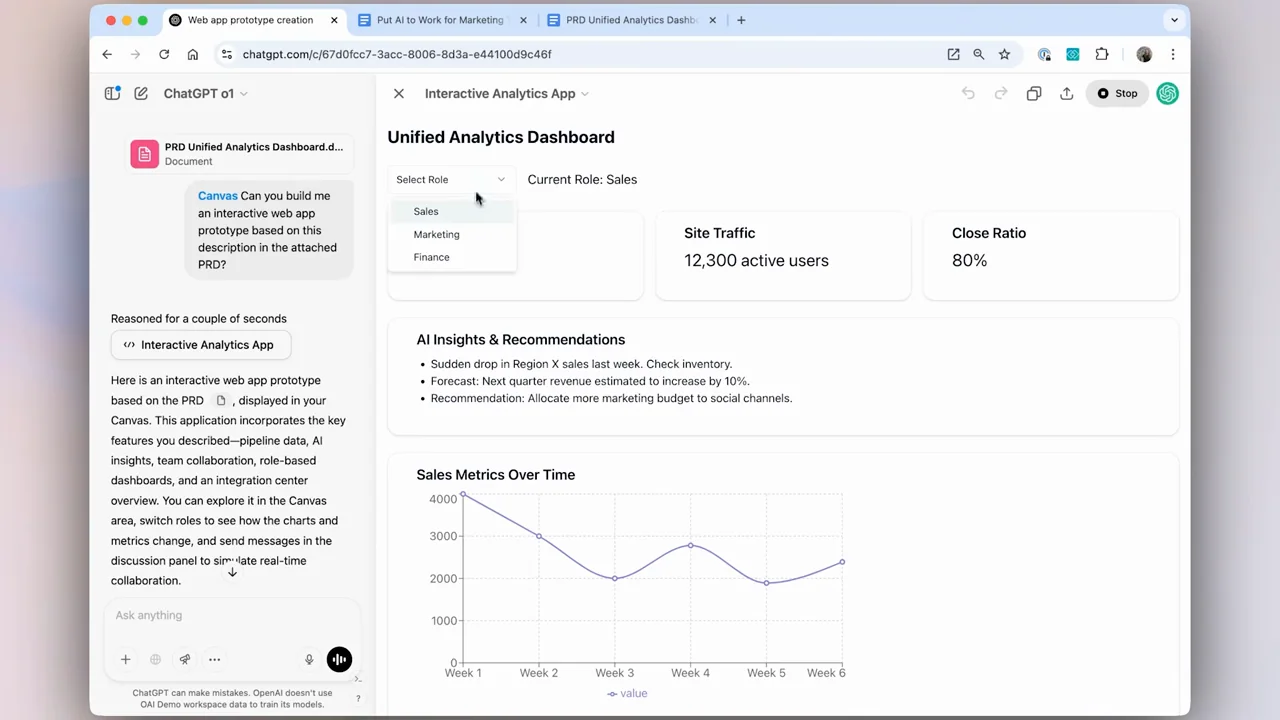
An attached product brief becomes canvas code and then a running dashboard prototype, with selection and preview controls visible along the way.
Useful to borrow
Keep source brief, generated code, and interactive preview in a traceable sequence.
Do not infer
The generated analytics dashboard is a prototype shown in the demo, not a built-in analytics feature or validated business dataset.
Look closer
- Keep the originating request beside the running preview · 01:30–01:38
8 shot groups.
Read across from the observed content to its treatment and possible adaptation. Enlarge the frame for detail.
Approximate study intervals; horizontal scrolling reveals all columns on small screens.
| Moment / source | Reference frame | What is on screen | Framing / edit | Useful adaptation |
|---|---|---|---|---|
| Shot group 01 ≈ 00:00–00:12 Title / identityWatch from here ↗ | Sample 00:08.000 | Prototype tutorial opener A how-to title introduces interactive prototyping. | White title field. | Frame the intended artifact. |
| Shot group 02 ≈ 00:12–00:32 App / browser screenWatch from here ↗ | Sample 00:24.000 | Canvas request The browser tools menu leads to a request for an app based on an attached brief. | Menu-to-composer progression. | Show the chosen tool and input. |
| Shot group 03 ≈ 00:32–00:48 App / browser screenWatch from here ↗ | Sample 00:40.000 | Source brief A file picker and source document establish the specification. | Temporary cutaway to source material. | Make the brief inspectable without reading it all. |
| Shot group 04 ≈ 00:48–01:16 App / browser screenWatch from here ↗ | Sample 01:08.000 | Code generation and selection Code fills the canvas, followed by an enlarged selected data array. | Split workspace into code detail. | Emphasize the portion being changed. |
| Shot group 05 ≈ 01:16–01:32 App / browser screenWatch from here ↗ | Sample 01:24.000 | Canvas controls Contextual controls and conversation summary remain beside the code. | Stable two-pane context. | Preserve the connection between request and implementation. |
| Shot group 06 ≈ 01:32–01:52 App / browser screenWatch from here ↗ | Sample 01:40.000 | Running preview The canvas switches through loading into a dashboard with chart and filter controls. | Code-to-live-preview reveal. | Show a runnable result, not just source text. |
| Shot group 07 ≈ 01:52–02:04 App / browser screenWatch from here ↗ | Sample 01:56.000 | Interactive details Closer filter controls return to the whole running prototype. | Detail then context. | Demonstrate a visible interaction. |
| Shot group 08 ≈ 02:04–02:09 Title / identityWatch from here ↗ | Sample 02:08.000 | End mark The prototype clears to a white ending. | Brief closing hold. | Stop after the interaction. |