Output montage / 00:55 / Published 2025-12-16
ChatGPT Images
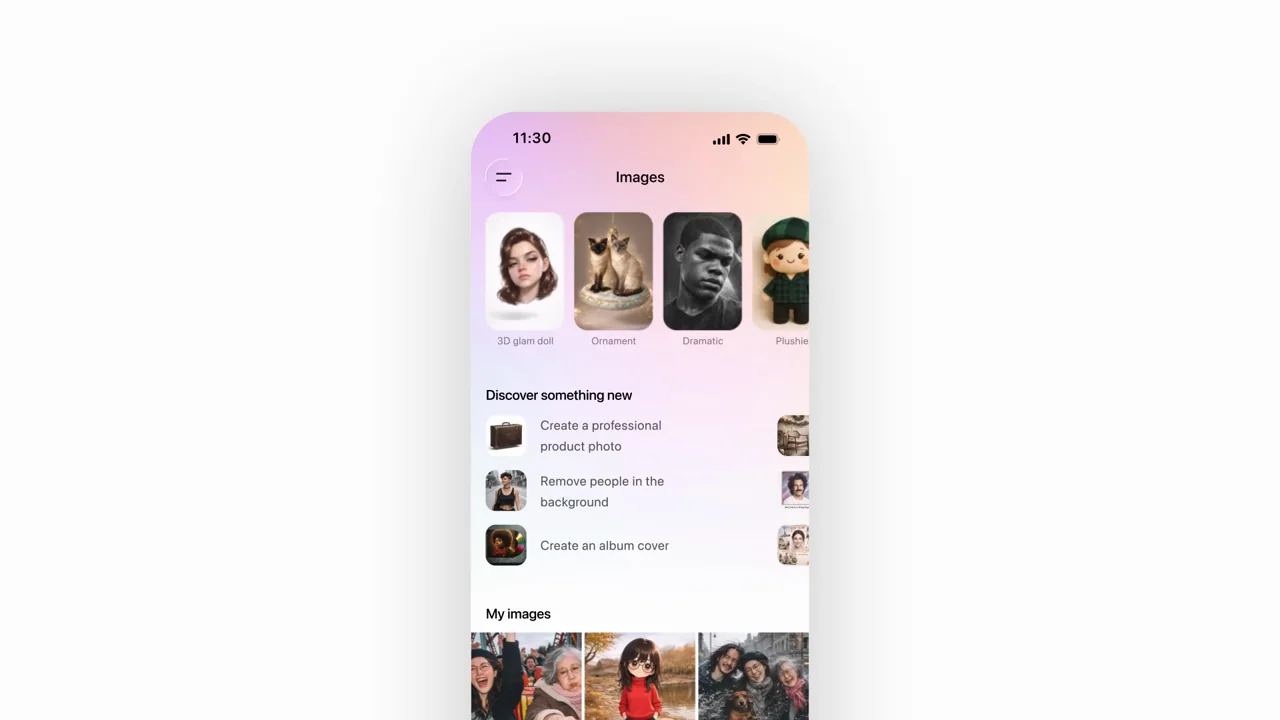
Most of this film is an escalating montage of image variations, not an app walkthrough. A recurring subject keeps the collage coherent. Only near the end does a phone show the Images interface.
Useful to borrow
Use a consistent subject for before/after comparisons. Move from a few readable examples to a gallery, then reveal where those results live in the product.
Do not infer
Do not label the photographic montage as screen capture. Avoid its high-density pace under detailed spoken explanation.
Look closer
- Hold the subject through aspect-ratio changes · 00:05–00:10
- Turn a cutout into a lateral sequence · 00:12–00:16
- Accumulate a diagonal trail of outputs · 00:25–00:30
- Reveal where the results live · 00:47–00:51
10 shot groups.
Read across from the observed content to its treatment and possible adaptation. Enlarge the frame for detail.
Approximate study intervals; horizontal scrolling reveals all columns on small screens.
| Moment / source | Reference frame | What is on screen | Framing / edit | Useful adaptation |
|---|---|---|---|---|
| Shot group 01 ≈ 00:00–00:03 Title / identityWatch from here ↗ | Sample 00:02.000 | Opening card A small portrait sits between the product-name words. | Centered type and image on white. | A single visual can carry the opening identity. |
| Shot group 02 ≈ 00:03–00:07 Isolated outputWatch from here ↗ | Sample 00:06.000 | Image variation A portrait changes styling while its subject stays consistent. | Same image position; successive variations. | Keep the comparison aligned. |
| Shot group 03 ≈ 00:07–00:14 Output montageWatch from here ↗ | Sample 00:10.000 | Image variation The subject appears in changed clothes, crops, and settings. | Overlapping image cards and cutout figures. | Use controlled variation rather than unrelated examples. |
| Shot group 04 ≈ 00:14–00:22 Output montageWatch from here ↗ | Sample 00:20.000 | Group image A recurring group changes composition and location. | Side-by-side examples become a centered group image. | Show what stays constant as well as what changes. |
| Shot group 05 ≈ 00:22–00:34 Output montageWatch from here ↗ | Sample 00:28.000 | Image gallery Travel and fantasy variations accumulate in layered cards. | Rapid stacked-image montage. | Reserve fast montage for breadth, not detailed reading. |
| Shot group 06 ≈ 00:34–00:43 Output montageWatch from here ↗ | Sample 00:38.000 | Image gallery Further illustrated and stylized variations accelerate the sequence. | Overlapping cards preserve the recurring people and dog. | Choose fewer examples for a narrated all-hands segment. |
| Shot group 07 ≈ 00:43–00:47 Isolated outputWatch from here ↗ | Sample 00:46.000 | Image variation A dog becomes the isolated subject of several transformations. | Larger individual result images. | A tighter subject can reset a busy montage. |
| Shot group 08 ≈ 00:47–00:48 Output montageWatch from here ↗ | Sample 00:48.000 | Result gallery Many prior images resolve into a tiled gallery. | Contact-sheet-like arrangement on white. | Use a gallery as a summary of demonstrated range. |
| Shot group 09 ≈ 00:48–00:51 App / browser screenWatch from here ↗ | Sample 00:50.000 | Mobile images gallery A phone reveals the Images landing surface and prior results. | Small centered device, distinct from the preceding output art. | Connect result examples to their actual product location. |
| Shot group 10 ≈ 00:51–00:55 Title / identityWatch from here ↗ | Sample 00:54.000 | End card A product title and source mark close the film. | White-field return. | End on a quiet frame rather than another montage. |