Presenter demo / 01:59 / Published 2026-07-21
Plugins in ChatGPT
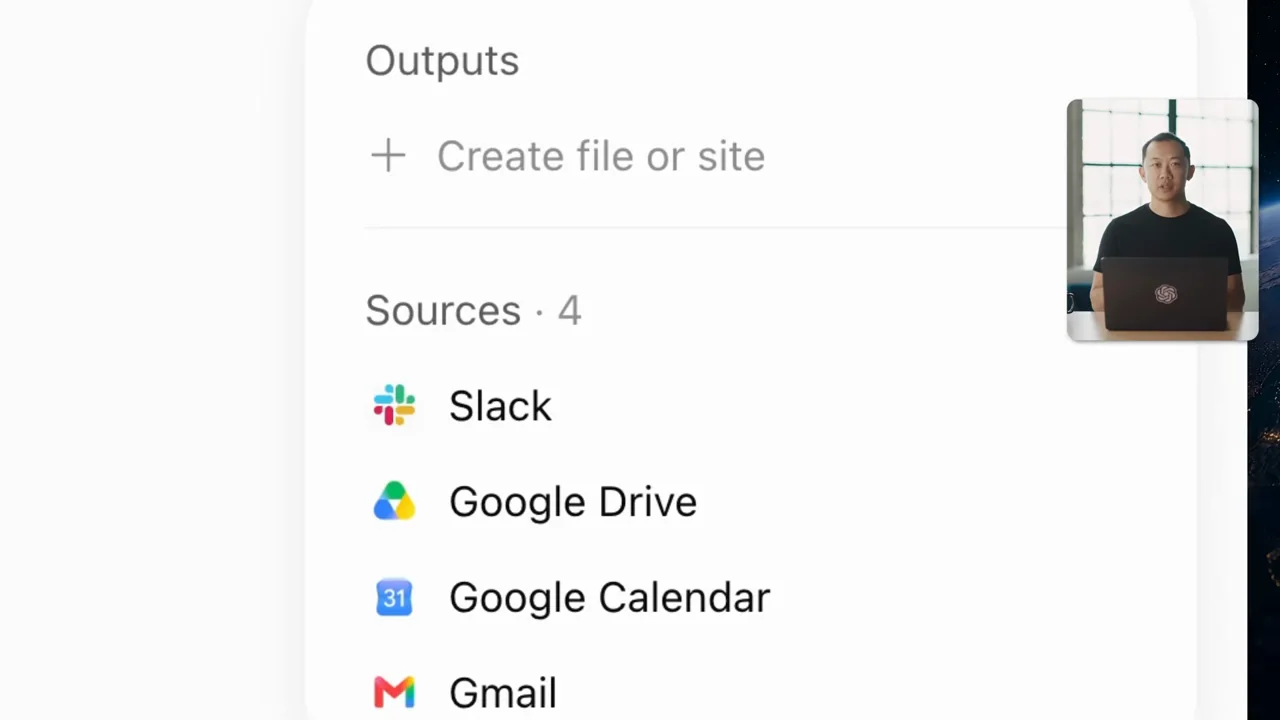
A presenter-led overview connects a plugin catalog to two tasks: creative output and a multi-source meeting brief. The source rail is the clearest evidence treatment.
Useful to borrow
Move from tool discovery to a concrete request, then expose the sources behind a result. Keep output examples distinct from the tools that produced them.
Do not infer
Long presenter passages and dictation waveforms are not app-workflow proof by themselves. The study does not infer spoken content from the waveform or audit current plugin availability.
16 shot groups.
Read across from the observed content to its treatment and possible adaptation. Enlarge the frame for detail.
Approximate study intervals; horizontal scrolling reveals all columns on small screens.
| Moment / source | Reference frame | What is on screen | Framing / edit | Useful adaptation |
|---|---|---|---|---|
| Shot group 01 ≈ 00:00–00:04 People / environmentWatch from here ↗ | Sample 00:02.000 | Topic opening A seated presenter is overlaid with a tools-and-plugins title. | Large type arranged around the speaker. | Use a short title without duplicating the talking head. |
| Shot group 02 ≈ 00:04–00:16 People / environmentWatch from here ↗ | Sample 00:10.000 | Presenter introduction Close and wide presenter shots carry the setup. | Alternating scales in the same room. | Keep this explanatory role in the supplied recording. |
| Shot group 03 ≈ 00:16–00:18 App / browser screenWatch from here ↗ | Sample 00:16.000 | Plugin catalog A catalog displays integrations and tool categories. | Whole-window discovery view. | Establish where a capability is selected. |
| Shot group 04 ≈ 00:18–00:20 App / browser screenWatch from here ↗ | Sample 00:18.000 | Drive task example A composer shows a file-oriented task with an integration chip. | Tight prompt crop. | Tie the selected tool to a specific user task. |
| Shot group 05 ≈ 00:20–00:24 App / browser screenWatch from here ↗ | Sample 00:22.000 | Slack task example The composer switches to a communication-oriented example. | Matched framing across two task categories. | Compare distinct workflows with consistent visual scale. |
| Shot group 06 ≈ 00:24–00:44 People / environmentWatch from here ↗ | Sample 00:34.000 | Presenter explanation The presenter returns for an extended explanation. | Wide and close desk shots. | Avoid filling a long explanation with meaningless UI motion. |
| Shot group 07 ≈ 00:44–00:54 App / browser screenWatch from here ↗ | Sample 00:48.000 | Creative-task dictation A waveform occupies the composer during a voice-input sequence. | Close input-state crop with a presenter inset. | Show the actual voice-input state without adding duplicate narration. |
| Shot group 08 ≈ 00:54–01:00 App / browser screenWatch from here ↗ | Sample 00:58.000 | Creative output options Several school-event flyer designs appear in the conversation. | Option strip followed by larger individual previews. | Show breadth, then one readable representative output. |
| Shot group 09 ≈ 01:00–01:18 People / environmentWatch from here ↗ | Sample 01:08.000 | Presenter bridge The speaker introduces the next task between UI sequences. | Human chapter break. | Use a content transition in the companion presentation. |
| Shot group 10 ≈ 01:18–01:28 App / browser screenWatch from here ↗ | Sample 01:22.000 | Meeting-task dictation A second voice-input waveform is shown before task submission. | Same composer grammar for a different request. | Make the next task context explicit rather than replaying a generic waveform. |
| Shot group 11 ≈ 01:28–01:31 App / browser screenWatch from here ↗ | Sample 01:30.000 | Connected-source activity The task lists interactions with communication, file, and calendar sources. | Close status-row crop. | Show which sources contribute to the answer. |
| Shot group 12 ≈ 01:31–01:34 App / browser screenWatch from here ↗ | Sample 01:32.000 | Source rail A dedicated source list names four connected services. | Isolated rail crop improves provenance legibility. | Use a source list as evidence, not decorative integration logos. |
| Shot group 13 ≈ 01:34–01:37 App / browser screenWatch from here ↗ | Sample 01:36.000 | Meeting brief An executive-review brief displays summary and decision sections. | Whole result view with sources retained at the side. | Keep the answer connected to its source context. |
| Shot group 14 ≈ 01:37–01:40 App / browser screenWatch from here ↗ | Sample 01:38.000 | Agenda and risks The brief scrolls to an agenda and risk table. | Interior content after the opening summary. | Inspect an actionable section, not only a heading. |
| Shot group 15 ≈ 01:40–01:58 People / environmentWatch from here ↗ | Sample 01:48.000 | Presenter conclusion Wide and close presenter shots carry the closing explanation. | Return to the established human composition. | Let the talking head finish while visuals settle. |
| Shot group 16 ≈ 01:58–01:59 Title / identityWatch from here ↗ | Sample 01:58.000 | End identity A white identity ending closes the film. | Minimal final card. | Use original presentation identity. |