Presenter demo / 01:27 / Published 2026-06-12
Debug web apps with browser use in Codex
A camera-led explanation uses short software inserts for a risky setting, approval, a slow application, diagnostic evidence, and the final result. The controls and before/after proof matter more than decorative motion.
Useful to borrow
Keep the permission step. Show the original problem, a diagnostic clue, and the resulting behavior in that order.
Do not infer
A video insert cannot establish a performance benchmark. Do not repeat its numerical results as claims about your product or recommend enabling the pictured risky setting.
12 shot groups.
Read across from the observed content to its treatment and possible adaptation. Enlarge the frame for detail.
Approximate study intervals; horizontal scrolling reveals all columns on small screens.
| Moment / source | Reference frame | What is on screen | Framing / edit | Useful adaptation |
|---|---|---|---|---|
| Shot group 01 ≈ 00:00–00:24 People / environmentWatch from here ↗ | Sample 00:14.000 | Presenter A presenter explains the setup across several camera cuts. | Medium and closer coverage. | Use the supplied talking head for this role. |
| Shot group 02 ≈ 00:24–00:28 App / browser screenWatch from here ↗ | Sample 00:26.000 | Browser permissions A developer setting includes a visible elevated-risk warning. | Close settings crop; toggle changes state. | Do not crop away risk or permission context. |
| Shot group 03 ≈ 00:28–00:35 People / environmentWatch from here ↗ | Sample 00:32.000 | Presenter The presenter returns between setup and consent. | Camera coverage. | The companion video should follow the recorded explanation. |
| Shot group 04 ≈ 00:35–00:37 App / browser screenWatch from here ↗ | Sample 00:36.000 | Approval / consent An approval card asks to allow browser access. | Tight card framing retains the warning and buttons. | Show consequential consent as part of the workflow. |
| Shot group 05 ≈ 00:37–00:39 People / environmentWatch from here ↗ | Sample 00:38.000 | Presenter A brief camera beat bridges to the example. | Medium close-up. | A beat can be held on a relevant screen instead. |
| Shot group 06 ≈ 00:39–00:48 App / browser screenWatch from here ↗ | Sample 00:44.000 | Demo web app A chat-style web app is exercised in a browser panel. | Interface is framed as the subject of debugging. | Distinguish the demo app from the assistant's own UI. |
| Shot group 07 ≈ 00:48–00:57 People / environmentWatch from here ↗ | Sample 00:52.000 | Presenter The presenter explains the observed behavior. | Multiple camera crops. | The separate OBS stream supplies explanation. |
| Shot group 08 ≈ 00:57–01:01 App / browser screenWatch from here ↗ | Sample 01:00.000 | Diagnostic output Structured trace data and its interpretation appear in the task response. | Close code/data block and explanatory text. | Use a representative diagnostic clue instead of decorative code. |
| Shot group 09 ≈ 01:01–01:07 People / environmentWatch from here ↗ | Sample 01:04.000 | Presenter A camera beat connects diagnosis to result. | Medium framing. | Give the audience time to understand the cause. |
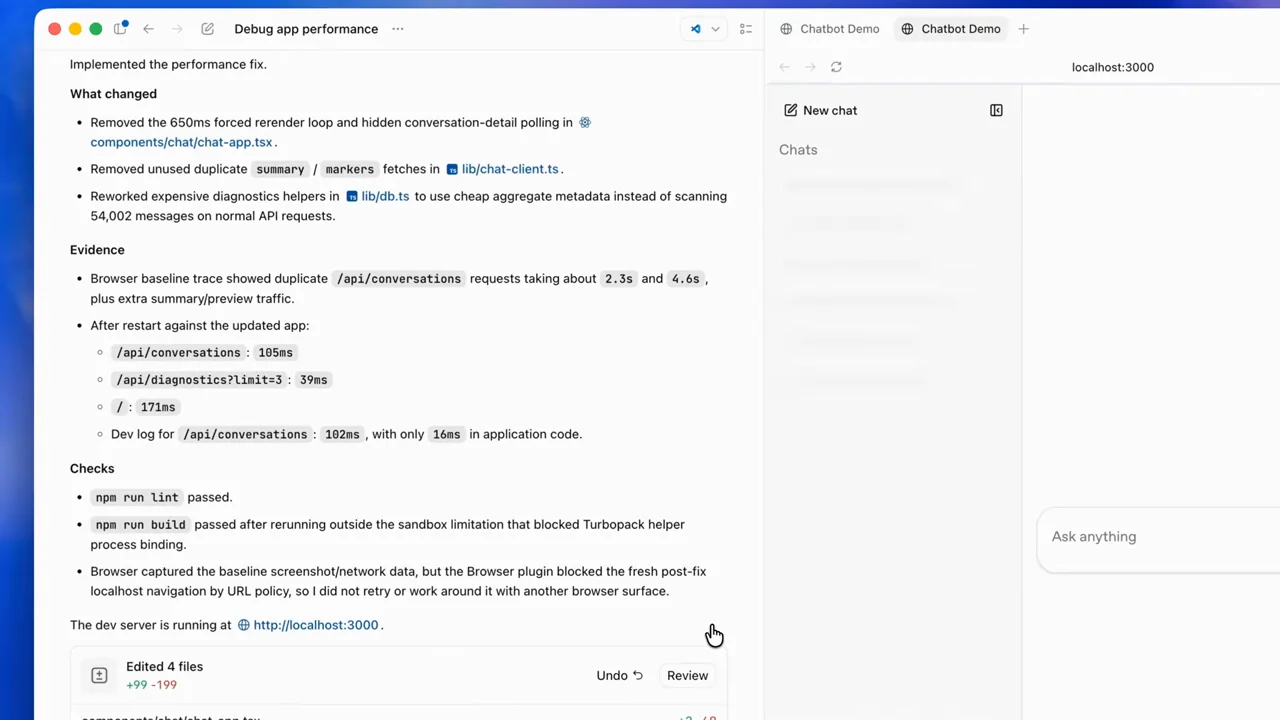
| Shot group 10 ≈ 01:07–01:14 App / browser screenWatch from here ↗ | Sample 01:10.000 | Result + browser A task summary and browser preview are visible together. | Close result context then whole-window pullback. | Close the loop on the same application that showed the problem. |
| Shot group 11 ≈ 01:14–01:25 People / environmentWatch from here ↗ | Sample 01:20.000 | Presenter The presenter concludes. | Stable camera coverage. | Keep the presentation ending ahead of the talking-head buffer. |
| Shot group 12 ≈ 01:25–01:27 Title / identityWatch from here ↗ | Sample 01:26.000 | End card A source identity and destination close the film. | Small type on white. | Use an original end slate for the presentation. |