Product film / 01:42 / Published 2026-06-10
Create campaign concepts and assets with Codex
A creative brief grows into a mood board, a localized image revision, style variants, campaign formats, and an editable external design.
Useful to borrow
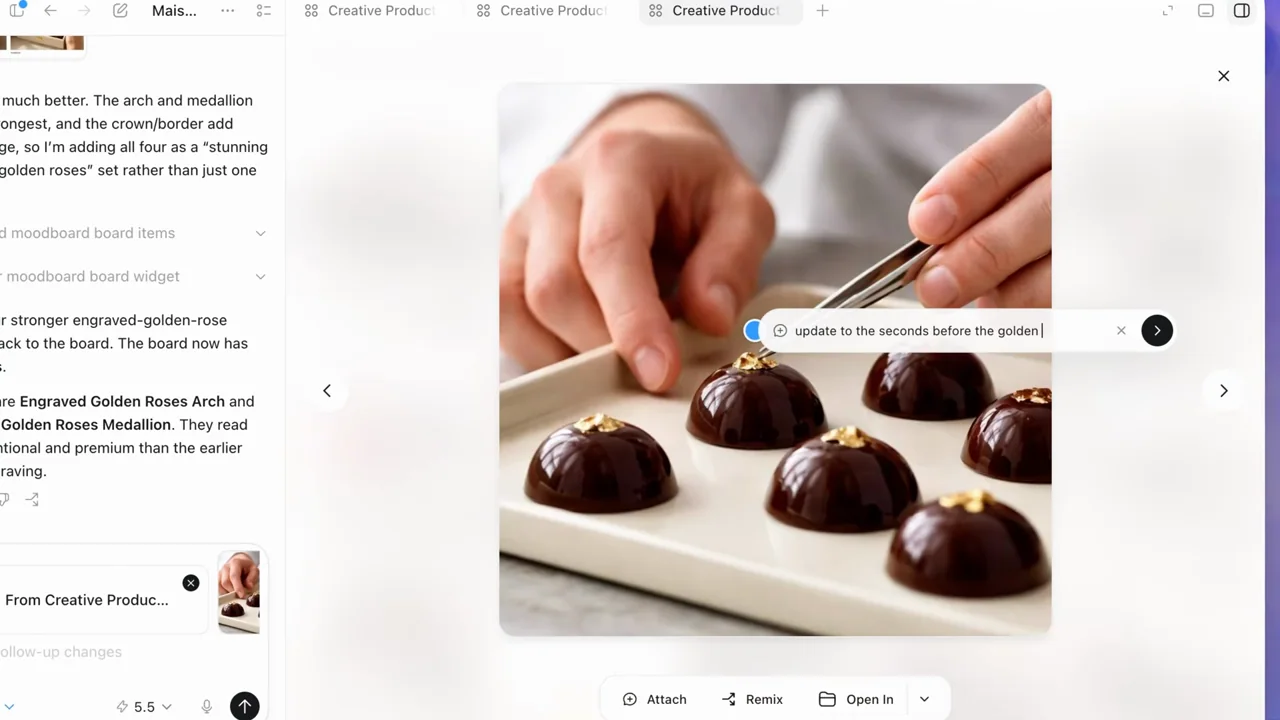
Keep the image and its instruction visible together. Distinguish a local edit, a global style change, a format adaptation, and a design-tool handoff.
Do not infer
The chocolate imagery, campaign identity, and generated designs are research material, not all-hands assets. The film does not establish equivalent your product image-editing behavior.
Look closer
- Pair a local request with the changed image · 00:23–00:29
19 shot groups.
Read across from the observed content to its treatment and possible adaptation. Enlarge the frame for detail.
Approximate study intervals; horizontal scrolling reveals all columns on small screens.
| Moment / source | Reference frame | What is on screen | Framing / edit | Useful adaptation |
|---|---|---|---|---|
| Shot group 01 ≈ 00:00–00:09 App / browser screenWatch from here ↗ | Sample 00:06.000 | Creative brief A campaign request includes a visual reference attachment. | Whole-window composer with a small source image. | Show the actual inputs behind a creative result. |
| Shot group 02 ≈ 00:09–00:14 App / browser screenWatch from here ↗ | Sample 00:12.000 | Mood-board choices A structured brief offers visual-direction and subject choices. | Close crop on selectable creative constraints. | Make the chosen direction visible rather than unexplained. |
| Shot group 03 ≈ 00:14–00:18 App / browser screenWatch from here ↗ | Sample 00:16.000 | Mood-board gallery A grid of chocolate campaign images appears beside the conversation. | Two-pane layout separates guidance and outputs. | Establish the collection before examining one image. |
| Shot group 04 ≈ 00:18–00:21 App / browser screenWatch from here ↗ | Sample 00:20.000 | Image selection One image opens large and a region receives a contextual edit control. | Single-image focus retains the conversation edge. | Show the exact area being changed. |
| Shot group 05 ≈ 00:21–00:27 App / browser screenWatch from here ↗ | Sample 00:24.000 | Localized revision request A short instruction sits over the selected image region. | Tight crop joins the target and requested change. | Keep the modification specific and visually checkable. |
| Shot group 06 ≈ 00:27–00:32 App / browser screenWatch from here ↗ | Sample 00:30.000 | Revised image result A changed version of the chocolate-making image appears. | Return to the wider image-and-conversation view. | Use matched subject matter to make the difference apparent. |
| Shot group 07 ≈ 00:32–00:36 App / browser screenWatch from here ↗ | Sample 00:34.000 | Second image choice The gallery returns and a different product composition opens. | Grid-to-detail navigation. | Choose a second example with a distinct composition. |
| Shot group 08 ≈ 00:36–00:40 App / browser screenWatch from here ↗ | Sample 00:38.000 | Style controls Style categories and preset descriptions appear below the image. | Control-focused crop keeps the source image above. | Differentiate a global treatment from a local edit. |
| Shot group 09 ≈ 00:40–00:44 App / browser screenWatch from here ↗ | Sample 00:42.000 | Styled result The product arrangement returns with a darker, more directional treatment. | Same output area supports a visual comparison. | Hold the changed result long enough to inspect it. |
| Shot group 10 ≈ 00:44–00:55 App / browser screenWatch from here ↗ | Sample 00:50.000 | Gallery selection The board is revisited, scrolled, and images are selected for the next task. | Stable grid with selection feedback and a bottom action bar. | Show which inputs will feed the next output set. |
| Shot group 11 ≈ 00:55–01:03 App / browser screenWatch from here ↗ | Sample 01:00.000 | Campaign-format request Selected images accompany a request for opening campaign material. | Conversation and chosen-image board share the frame. | Connect a batch transformation to its selected sources. |
| Shot group 12 ≈ 01:03–01:08 App / browser screenWatch from here ↗ | Sample 01:06.000 | Campaign variants A new board contains multiple aspect ratios and layouts. | Grid reveals the output family before close inspection. | Use the collection view to show scope without counting every tile. |
| Shot group 13 ≈ 01:08–01:12 App / browser screenWatch from here ↗ | Sample 01:10.000 | Square campaign designs Square campaign compositions are opened in the image viewer. | Matched viewer frame across related designs. | Compare two treatments of the same communication task. |
| Shot group 14 ≈ 01:12–01:17 App / browser screenWatch from here ↗ | Sample 01:14.000 | Landscape and portrait formats The viewer moves through wide and tall campaign layouts. | Changing aspect ratio is the meaningful visual difference. | Show that a format adaptation is composed, not merely cropped. |
| Shot group 15 ≈ 01:17–01:22 App / browser screenWatch from here ↗ | Sample 01:18.000 | External design destination The selected design exposes an Open-in destination menu. | Close control view over the selected artifact. | Make the handoff destination explicit. |
| Shot group 16 ≈ 01:22–01:26 App / browser screenWatch from here ↗ | Sample 01:24.000 | Editable-design handoff A response provides a link to an editable design. | Result link remains beside the source artwork. | Show the handoff artifact before leaving the source application. |
| Shot group 17 ≈ 01:26–01:30 App / browser screenWatch from here ↗ | Sample 01:28.000 | Canva text edit The design opens in Canva and its date text is edited. | Editor chrome and selected text prove editability. | Verify a handoff with a visible edit, not just an opened page. |
| Shot group 18 ≈ 01:30–01:35 App / browser screenWatch from here ↗ | Sample 01:32.000 | Canva image layer The image layer is selected and adjusted within the design. | Native bounding box exposes the editable object. | Show that the visual layer remains separately manipulable. |
| Shot group 19 ≈ 01:35–01:42 App / browser screenWatch from here ↗ | Sample 01:38.000 | Finished external design The completed design remains in the external editor. | Longer result hold; no separate brand card. | A quiet result hold can support the speaker's final explanation. |