Product film / 02:12 / Published 2026-02-02
A first look at the Codex app
A desktop tour organized by small chapter cards. A rapid opening push settles before typing; later crops emphasize selectors, voice input, worktrees, skills, schedules, and review rather than moving continuously.
Useful to borrow
Use motion to arrive at a useful crop, then stop. Alternate whole-window context with one readable control. Keep one task's result visible before opening another.
Do not infer
The source has many features in two minutes. Do not turn an all-hands update into an equally dense feature checklist or reproduce its desktop branding.
Look closer
- Follow the pointer, then restore the full workspace · 00:17–00:22
- Dim, confirm, dismiss, and reopen without a camera move · 00:58–01:03
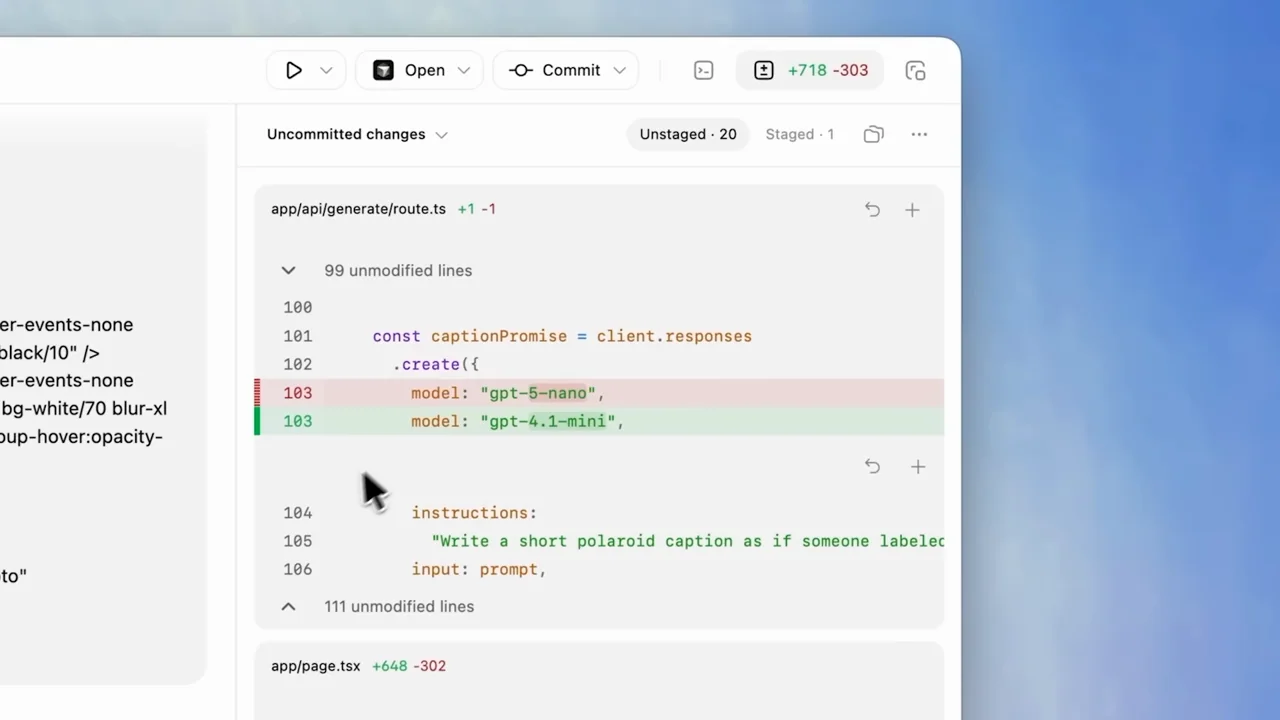
- Open the diff before pushing into its detail · 01:32–01:38
- Move quickly; let the interaction breathe · 00:03–00:05
24 shot groups.
Read across from the observed content to its treatment and possible adaptation. Enlarge the frame for detail.
Approximate study intervals; horizontal scrolling reveals all columns on small screens.
| Moment / source | Reference frame | What is on screen | Framing / edit | Useful adaptation |
|---|---|---|---|---|
| Shot group 01 ≈ 00:00–00:02 Title / identityWatch from here ↗ | Sample 00:02.000 | Opening card A short product title on white. | Centered type; title-to-window boundary sampled closely. | A clean title is enough for the lead-in. |
| Shot group 02 ≈ 00:02–00:05 App / browser screenWatch from here ↗ | Sample 00:04.000 | Desktop shell The desktop window establishes the application before a rapid push. | Measured push concentrated around 3.9–4.3 seconds. | Move once, then allow reading. |
| Shot group 03 ≈ 00:05–00:08 App / browser screenWatch from here ↗ | Sample 00:06.000 | Project selector The project choice becomes the focal control. | Stable close crop after the push. | Show which project a task belongs to. |
| Shot group 04 ≈ 00:08–00:15 App / browser screenWatch from here ↗ | Sample 00:12.000 | Composer A change request is entered and sent. | Composer close-up; cursor movement carries the action. | Hold the completed request long enough to understand it. |
| Shot group 05 ≈ 00:15–00:17 Title / identityWatch from here ↗ | Sample 00:16.000 | Chapter card A multitasking chapter separates workflows. | White type card. | Use a chapter transition when the subject changes. |
| Shot group 06 ≈ 00:17–00:22 App / browser screenWatch from here ↗ | Sample 00:20.000 | Thread sidebar The sidebar and new-thread action show multiple work contexts. | Close sidebar followed by wider context. | Highlight navigation without losing the application frame. |
| Shot group 07 ≈ 00:22–00:25 Title / identityWatch from here ↗ | Sample 00:24.000 | Chapter card A voice-input chapter introduces a different interaction. | Short white card. | Name the interaction before showing its tiny control. |
| Shot group 08 ≈ 00:25–00:31 App / browser screenWatch from here ↗ | Sample 00:30.000 | Voice input The microphone control changes into a waveform. | Fixed composer crop with state changes. | Let the control state explain recording without extra graphics. |
| Shot group 09 ≈ 00:31–00:34 Title / identityWatch from here ↗ | Sample 00:32.000 | Chapter card A worktree chapter resets the scene. | Two-line title. | Keep headings concise when two lines are necessary. |
| Shot group 10 ≈ 00:34–00:39 App / browser screenWatch from here ↗ | Sample 00:38.000 | Project selector The selected project changes. | Close upper-center framing. | Orient the audience before the task begins. |
| Shot group 11 ≈ 00:39–00:47 App / browser screenWatch from here ↗ | Sample 00:44.000 | Composer / worktree The worktree mode is selected and a task is entered. | Lower-window crop with mode controls in frame. | Retain the setting that makes this task different. |
| Shot group 12 ≈ 00:47–00:58 App / browser screenWatch from here ↗ | Sample 00:54.000 | Agent activity The full window shows task activity and a completed response. | Stable desktop view with visible content progression. | Keep a little process evidence, not every wait. |
| Shot group 13 ≈ 00:58–01:07 App / browser screenWatch from here ↗ | Sample 01:02.000 | Commit dialog The commit action opens a dialog and advances through status. | Upper-toolbar crop then centered modal. | Show the actual completion or handoff step. |
| Shot group 14 ≈ 01:07–01:09 Title / identityWatch from here ↗ | Sample 01:08.000 | Chapter card A skills chapter introduces reusable actions. | White title reset. | Label a new abstraction before showing its menu. |
| Shot group 15 ≈ 01:09–01:13 App / browser screenWatch from here ↗ | Sample 01:12.000 | Skills menu A skill panel and picker appear. | Window context followed by a composer-menu crop. | Use the real picker, not a recreated feature list. |
| Shot group 16 ≈ 01:13–01:20 App / browser screenWatch from here ↗ | Sample 01:16.000 | Composer / skill A selected skill appears in the prompt and produces activity. | Close prompt with a recognizable tagged action. | Connect selection to its effect. |
| Shot group 17 ≈ 01:20–01:30 App / browser screenWatch from here ↗ | Sample 01:26.000 | Automation form The automation page opens a scheduling form. | Page context, modal, then closer form framing. | Show the name, task, and cadence without long typing. |
| Shot group 18 ≈ 01:30–01:32 Title / identityWatch from here ↗ | Sample 01:32.000 | Chapter card A review chapter separates the next task. | White reset. | Use a clear break before dense code. |
| Shot group 19 ≈ 01:32–01:38 App / browser screenWatch from here ↗ | Sample 01:36.000 | Code review A code diff is shown beside the task conversation. | Wide split view into a close diff crop. | Make the relevant changed lines readable. |
| Shot group 20 ≈ 01:38–01:47 App / browser screenWatch from here ↗ | Sample 01:40.000 | Code review comment An inline comment is entered, then the wider review returns. | Close action followed by contextual result. | Retain both the comment and what it refers to. |
| Shot group 21 ≈ 01:47–01:49 Title / identityWatch from here ↗ | Sample 01:48.000 | Chapter card A portable-window chapter introduces the final behavior. | Short statement on white. | Signal a layout change before the application moves. |
| Shot group 22 ≈ 01:49–02:01 App / browser screenWatch from here ↗ | Sample 01:58.000 | Floating window The task window becomes a smaller floating companion. | Whole-window context and a control close-up. | Track the same object across a layout change. |
| Shot group 23 ≈ 02:01–02:07 App / browser screenWatch from here ↗ | Sample 02:04.000 | Generated site / preview A finished website remains visible beside the small task panel. | Result and assistant share the desktop. | Finish with the thing that was built. |
| Shot group 24 ≈ 02:07–02:12 Title / identityWatch from here ↗ | Sample 02:12.000 | End card The application gives way to the source identity. | Type and logo on white. | Leave a calm, unmistakable ending frame. |