Screen tutorial / 01:19 / Published 2026-05-01
Bring your work into Codex in a few clicks
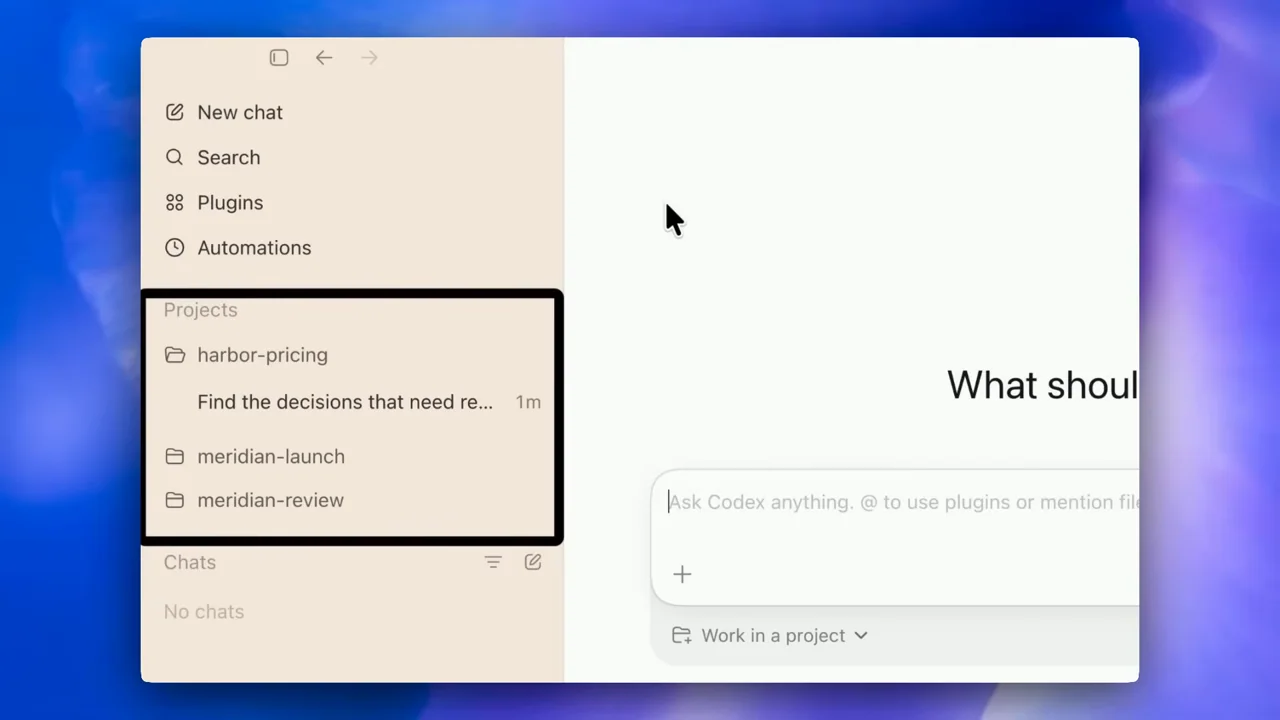
Onboarding choices lead into a plugin inventory, highlighted navigation, and a source-informed meeting brief.
Useful to borrow
Explain a new workspace by showing imported settings and a first useful result.
Do not infer
An enabled switch does not prove a successful third-party task.
Look closer
- Explain navigation with one callout at a time · 00:44–00:52
6 shot groups.
Read across from the observed content to its treatment and possible adaptation. Enlarge the frame for detail.
Approximate study intervals; horizontal scrolling reveals all columns on small screens.
| Moment / source | Reference frame | What is on screen | Framing / edit | Useful adaptation |
|---|---|---|---|---|
| Shot group 01 ≈ 00:00–00:10 App / browser screenWatch from here ↗ | Sample 00:04.000 | Role selection The onboarding screen selects a work category. | Centered setup panel. | Show the choice that changes the setup. |
| Shot group 02 ≈ 00:10–00:22 App / browser screenWatch from here ↗ | Sample 00:16.000 | Bring settings Import options and a toggle sit above Continue. | Stable form with readable options. | Retain the user's choices. |
| Shot group 03 ≈ 00:22–00:42 App / browser screenWatch from here ↗ | Sample 00:32.000 | Enabled plugins A plugin list scrolls through enabled integrations. | Wide list becomes a closer control view. | Show only integrations relevant to the story. |
| Shot group 04 ≈ 00:42–00:58 App / browser screenWatch from here ↗ | Sample 00:52.000 | Workspace orientation Black outline callouts identify navigation and imported projects. | Editorial rectangles over real UI. | Clearly distinguish annotations from product controls. |
| Shot group 05 ≈ 00:58–01:14 App / browser screenWatch from here ↗ | Sample 01:08.000 | Meeting brief A multi-source request becomes a structured brief. | Input and output stay in the same window. | End onboarding on a useful task. |
| Shot group 06 ≈ 01:14–01:19 Title / identityWatch from here ↗ | Sample 01:16.000 | Brand ending A white mark replaces the app. | Centered type. | Use your own closing identity. |