Product film / 00:41 / Published 2026-06-15
Build and test iOS apps without leaving Codex
A compact app-only sequence moves from a request to an embedded phone simulator, element inspection, a code change, and a working share sheet.
Useful to borrow
Keep the conversation and tested interface together, then use native element highlighting to direct attention to the affected control.
Do not infer
The phone is a simulator inside the demo, not an independently filmed mobile device. Preserve that distinction and verify any equivalent your product workflow.
Look closer
- A desktop push-in that leaves the composer readable · 00:00–00:05
- Select the target before entering the instruction · 00:10–00:15
11 shot groups.
Read across from the observed content to its treatment and possible adaptation. Enlarge the frame for detail.
Approximate study intervals; horizontal scrolling reveals all columns on small screens.
| Moment / source | Reference frame | What is on screen | Framing / edit | Useful adaptation |
|---|---|---|---|---|
| Shot group 01 ≈ 00:00–00:05 App / browser screenWatch from here ↗ | Sample 00:04.000 | Project composer A simulator-related request is entered in the project composer. | Full-window opening tightens around the prompt. | Start with the action the speaker is describing. |
| Shot group 02 ≈ 00:05–00:08 App / browser screenWatch from here ↗ | Sample 00:06.000 | Task response The submitted request becomes a conversation with working status. | Simple white conversation view. | Keep the task's initiating state before showing its outcome. |
| Shot group 03 ≈ 00:08–00:11 App / browser screenWatch from here ↗ | Sample 00:10.000 | Embedded iOS simulator A phone simulator appears beside the task and tool rail. | Wide establishment followed by a simulator-favoring crop. | Show the relationship between command and test environment. |
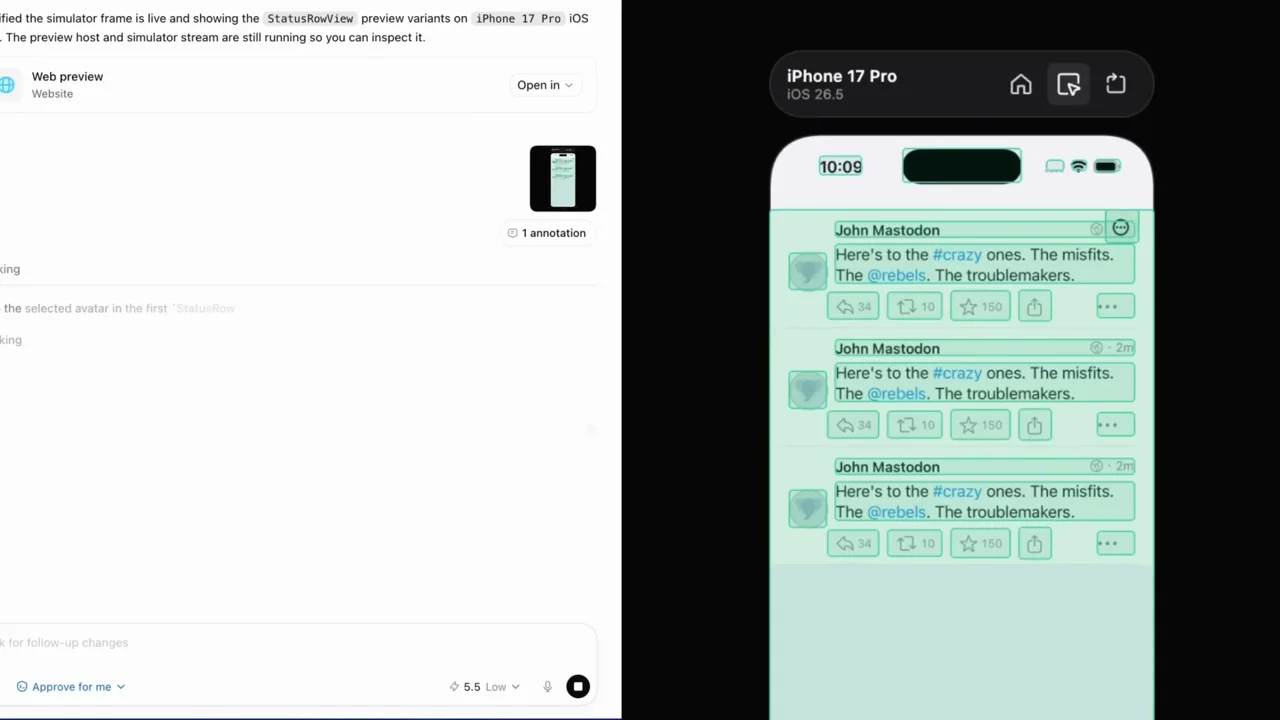
| Shot group 04 ≈ 00:11–00:15 App / browser screenWatch from here ↗ | Sample 00:14.000 | Element inspection The phone interface receives a colored element overlay and a contextual prompt. | Native inspect highlight directs attention. | Use real selection feedback rather than invented callouts. |
| Shot group 05 ≈ 00:15–00:18 App / browser screenWatch from here ↗ | Sample 00:16.000 | Inspection target change A different element is highlighted with a small identifier tooltip. | Same phone position makes the target change apparent. | Keep a stable frame while identifying a specific control. |
| Shot group 06 ≈ 00:18–00:23 App / browser screenWatch from here ↗ | Sample 00:20.000 | Conversation and simulator The task discusses the selected element while the simulator remains beside it. | Balanced split view preserves cause and effect. | Pair the request with the exact UI region it concerns. |
| Shot group 07 ≈ 00:23–00:27 App / browser screenWatch from here ↗ | Sample 00:26.000 | Changed-file result The response shows an edited-file summary alongside the unhighlighted app. | Conversation and runtime result share the frame. | Distinguish a code edit from verification of its behavior. |
| Shot group 08 ≈ 00:27–00:30 App / browser screenWatch from here ↗ | Sample 00:28.000 | Follow-up test request A short follow-up asks to exercise the sharing behavior. | Stable conversation crop with the phone still visible. | Make the validation action explicit. |
| Shot group 09 ≈ 00:30–00:33 App / browser screenWatch from here ↗ | Sample 00:32.000 | Phone action menu A post menu opens and exposes sharing options. | The menu is the new visual event. | Hold on the control that leads to the result. |
| Shot group 10 ≈ 00:33–00:37 App / browser screenWatch from here ↗ | Sample 00:36.000 | Share-as-image sheet A sheet displays a post preview and a share action. | Contained result replaces the menu without leaving the phone. | End on the user-visible behavior, not the code diff. |
| Shot group 11 ≈ 00:37–00:41 Title / identityWatch from here ↗ | Sample 00:40.000 | End identity A white identity ending replaces the simulator. | Clean visual stop. | Leave the remaining wave and pause to the talking head. |