Product film / 02:28 / Published 2026-06-04
Build and share interactive prototypes in Codex
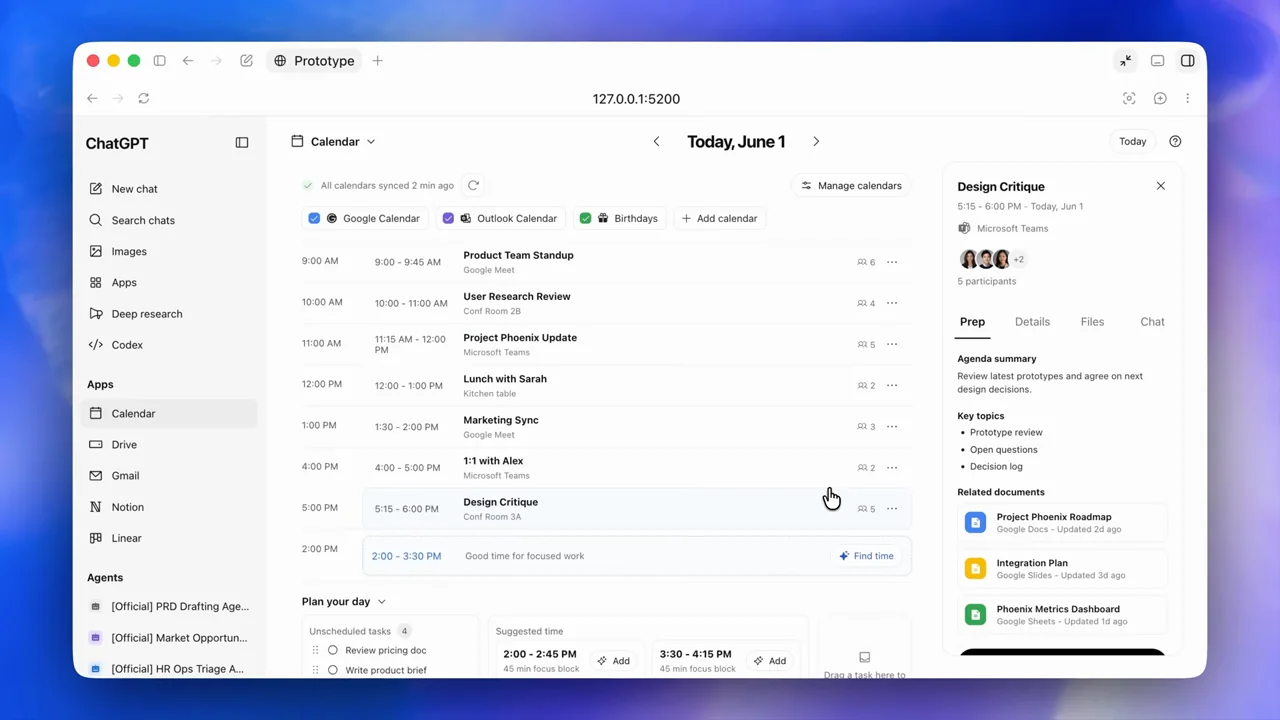
A screen-only walkthrough develops a calendar concept through clarification, design alternatives, an interactive prototype, a design-file handoff, and a shared browser version.
Useful to borrow
Expose intermediate design decisions and distinguish a generated mockup, a running prototype, an editable design file, and a published page.
Do not infer
The calendar interface is the demo's generated prototype, not proof of a shipped ChatGPT calendar feature. The long conversational stretches need selective adaptation.
Look closer
- Give the result a pane of its own · 00:51–00:55
26 shot groups.
Read across from the observed content to its treatment and possible adaptation. Enlarge the frame for detail.
Approximate study intervals; horizontal scrolling reveals all columns on small screens.
| Moment / source | Reference frame | What is on screen | Framing / edit | Useful adaptation |
|---|---|---|---|---|
| Shot group 01 ≈ 00:00–00:08 App / browser screenWatch from here ↗ | Sample 00:04.000 | Design request A calendar-feature request is entered using a product-design context. | Whole app on a blue desktop. | Establish the task and chosen workflow together. |
| Shot group 02 ≈ 00:08–00:15 App / browser screenWatch from here ↗ | Sample 00:12.000 | Workflow acknowledgement The conversation introduces the design process. | Stable app framing through the first response. | Retain only the planning text that matters to the story. |
| Shot group 03 ≈ 00:15–00:20 App / browser screenWatch from here ↗ | Sample 00:18.000 | Clarifying questions A structured set of design questions appears. | Readable text block rather than a fabricated progress graphic. | Show uncertainty being resolved before presenting a polished result. |
| Shot group 04 ≈ 00:20–00:24 App / browser screenWatch from here ↗ | Sample 00:22.000 | Brief answers A reply supplies scope and desired behavior. | Conversation scroll connects question and answer. | Keep meaningful human decisions in the workflow. |
| Shot group 05 ≈ 00:24–00:29 App / browser screenWatch from here ↗ | Sample 00:28.000 | Design brief approval A proposed brief is followed by a short approval. | Alternating message blocks in one frame. | Distinguish planning approval from completed implementation. |
| Shot group 06 ≈ 00:29–00:35 App / browser screenWatch from here ↗ | Sample 00:34.000 | Design alternatives Several visual directions appear as thumbnails beneath explanatory text. | Small option set embedded in the conversation. | Show alternatives before committing to one direction. |
| Shot group 07 ≈ 00:35–00:40 App / browser screenWatch from here ↗ | Sample 00:38.000 | Mockup lightbox Calendar mockups open in a dark image viewer with navigation arrows. | Image-only design surface inside recognizable viewer controls. | Use a lightbox to make a proposed layout readable. |
| Shot group 08 ≈ 00:40–00:45 App / browser screenWatch from here ↗ | Sample 00:42.000 | Prototype selection The conversation resumes with a request to build one direction. | Return to task context after viewing options. | Connect the selected concept to the next build step. |
| Shot group 09 ≈ 00:45–00:52 App / browser screenWatch from here ↗ | Sample 00:50.000 | Build progress and assets Implementation text is followed by small portrait assets. | Conversation remains the organizing surface. | Group preparation steps instead of showing every progress update. |
| Shot group 10 ≈ 00:52–00:57 App / browser screenWatch from here ↗ | Sample 00:54.000 | Prototype split view The running calendar prototype opens beside the conversation. | A new right pane gives the output its own space. | Reveal a usable artifact without losing its originating request. |
| Shot group 11 ≈ 00:57–01:02 App / browser screenWatch from here ↗ | Sample 01:00.000 | Design comparison A design image is opened alongside the prototype workflow. | Viewer and conversation remain visible together. | Compare the implementation against the intended layout. |
| Shot group 12 ≈ 01:02–01:09 App / browser screenWatch from here ↗ | Sample 01:06.000 | Prototype overview The agenda interface returns beside the build summary. | Stable split view shows navigation and event rows. | Establish the main layout before testing individual interactions. |
| Shot group 13 ≈ 01:09–01:13 App / browser screenWatch from here ↗ | Sample 01:10.000 | Prototype detail panel The prototype fills more of the window and an event's details are visible. | Wider artifact framing makes its side panel readable. | Expand the result when interaction becomes the subject. |
| Shot group 14 ≈ 01:13–01:19 App / browser screenWatch from here ↗ | Sample 01:14.000 | Event variation Different agenda items expose their associated detail content. | Matched layout across changing selected items. | Demonstrate behavior with a second item, not a duplicate static view. |
| Shot group 15 ≈ 01:19–01:23 App / browser screenWatch from here ↗ | Sample 01:20.000 | Agenda annotation A selected agenda row receives a blue inspection highlight. | Native overlay identifies the active row. | Use inspection to make a revision target unambiguous. |
| Shot group 16 ≈ 01:23–01:28 App / browser screenWatch from here ↗ | Sample 01:24.000 | Attachment annotation A related-files region is selected within the event detail panel. | Same prototype framing, different highlighted region. | Show the exact nested region under discussion. |
| Shot group 17 ≈ 01:28–01:35 App / browser screenWatch from here ↗ | Sample 01:32.000 | Design handoff request The conversation receives a request for a design-file concept page. | Return from runtime interaction to a written handoff. | Name the deliverable before switching applications. |
| Shot group 18 ≈ 01:35–01:42 App / browser screenWatch from here ↗ | Sample 01:38.000 | Handoff preparation The response describes the requested design-file content. | Conversation-only bridge. | Keep the relationship between the prototype and handoff explicit. |
| Shot group 19 ≈ 01:42–01:49 App / browser screenWatch from here ↗ | Sample 01:46.000 | Figma concept page A design canvas shows a concept page with a prototype image and supporting notes. | Whole editor establishes that this is an editable design artifact. | Retain editor chrome when editability is part of the claim. |
| Shot group 20 ≈ 01:49–01:55 App / browser screenWatch from here ↗ | Sample 01:52.000 | Editable text layers Text on the concept page is selected inside the design editor. | Native selection and properties panel supply proof. | Demonstrate editability with a real selected layer. |
| Shot group 21 ≈ 01:55–02:01 App / browser screenWatch from here ↗ | Sample 01:58.000 | Concept-page details The canvas scrolls to supporting workflow and interface material. | Vertical exploration within the same editor. | Show a useful interior section after the hero layout. |
| Shot group 22 ≈ 02:01–02:07 App / browser screenWatch from here ↗ | Sample 02:06.000 | Share request and result The conversation receives a sharing request and returns a site card. | Request-to-artifact handoff in the original app. | Keep the publish action separate from the prototype build. |
| Shot group 23 ≈ 02:07–02:15 App / browser screenWatch from here ↗ | Sample 02:12.000 | Shared browser prototype The calendar opens as a browser page and an event is selected. | Browser context replaces the development conversation. | Prove the result can be opened in its intended destination. |
| Shot group 24 ≈ 02:15–02:20 App / browser screenWatch from here ↗ | Sample 02:18.000 | Shared-page navigation The shared prototype moves through another agenda state. | Stable browser frame during interaction. | Validate more than the landing view. |
| Shot group 25 ≈ 02:20–02:24 App / browser screenWatch from here ↗ | Sample 02:22.000 | Published artifact card The conversation returns to the shared-site card. | Compact summary after the external result. | Leave a recognizable handoff artifact. |
| Shot group 26 ≈ 02:24–02:28 App / browser screenWatch from here ↗ | Sample 02:26.000 | New-task reset The film ends back at an empty composer. | Return to the opening app state. | A loopable reset is useful for a reel, not the required all-hands ending. |