Product film / 02:17 / Published 2026-06-11
Build sales account strategies and outreach with Codex
A sales workflow moves from ranked accounts to a pursuit deck, draft emails, and a recurring task. The strongest evidence is in the opened deliverables.
Useful to borrow
Show prioritization criteria, inspect representative output pages, then confirm draft status and scheduled behavior in their actual interfaces.
Do not infer
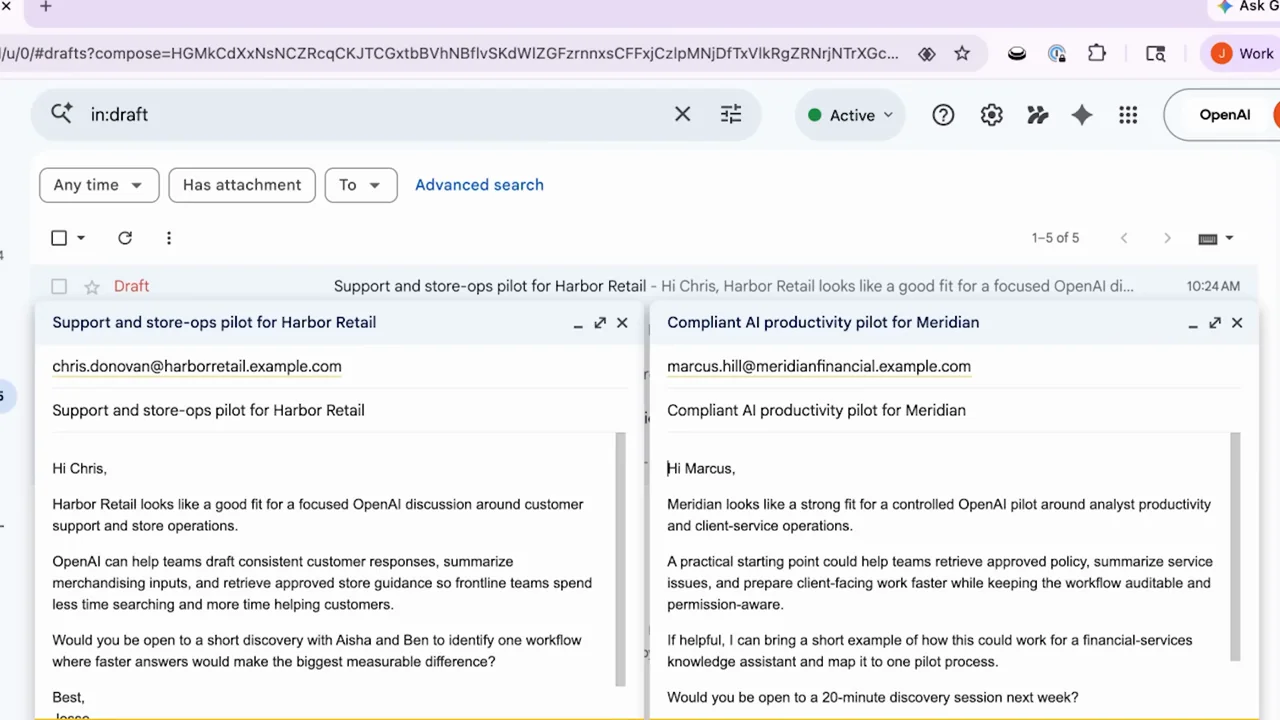
Several composer holds are long and text is small. Do not turn draft-email evidence into a claim that messages were sent, or copy source customer details.
17 shot groups.
Read across from the observed content to its treatment and possible adaptation. Enlarge the frame for detail.
Approximate study intervals; horizontal scrolling reveals all columns on small screens.
| Moment / source | Reference frame | What is on screen | Framing / edit | Useful adaptation |
|---|---|---|---|---|
| Shot group 01 ≈ 00:00–00:12 App / browser screenWatch from here ↗ | Sample 00:08.000 | Sales request A project composer receives an account-prioritization task. | Whole app within a colored desktop frame. | Start with a concrete business question. |
| Shot group 02 ≈ 00:12–00:16 App / browser screenWatch from here ↗ | Sample 00:14.000 | Analysis acknowledgement The task response introduces the account review. | Brief conversation state before results. | Retain enough context to explain the next table. |
| Shot group 03 ≈ 00:16–00:24 App / browser screenWatch from here ↗ | Sample 00:20.000 | Ranked account table A table groups accounts with colored priority markers and rationale. | Vertical table reveal inside the conversation. | Show the criteria behind a ranking, not only colored badges. |
| Shot group 04 ≈ 00:24–00:32 App / browser screenWatch from here ↗ | Sample 00:28.000 | Pursuit-deck request A follow-up asks for a presentation about selected accounts. | Composer beneath the retained ranking. | Connect the chosen accounts to the next deliverable. |
| Shot group 05 ≈ 00:32–00:42 App / browser screenWatch from here ↗ | Sample 00:38.000 | Deck preparation The response describes the account plan before returning a file. | Conversation-only production bridge. | Compress nonessential waiting while retaining the task relationship. |
| Shot group 06 ≈ 00:42–00:48 App / browser screenWatch from here ↗ | Sample 00:46.000 | Deck artifact and cover A presentation file opens beside the conversation. | Split view establishes the saved deck. | Open a deliverable rather than stopping at its filename. |
| Shot group 07 ≈ 00:48–00:51 App / browser screenWatch from here ↗ | Sample 00:50.000 | Priority and account slides The deck advances from ranking to a specific account plan. | Page thumbnails preserve deck context. | Pair the overall decision with a representative detail page. |
| Shot group 08 ≈ 00:51–00:58 App / browser screenWatch from here ↗ | Sample 00:54.000 | Additional account plans Two further account pages use the same structured layout. | Matched pages make differences in content easier to compare. | Use repeated structure for parallel examples. |
| Shot group 09 ≈ 00:58–01:12 App / browser screenWatch from here ↗ | Sample 01:06.000 | Outreach request The conversation receives a request to prepare outreach for the selected accounts. | Long composer beat beneath the deck result. | Shorten typing in production without changing the request's meaning. |
| Shot group 10 ≈ 01:12–01:20 App / browser screenWatch from here ↗ | Sample 01:18.000 | Draft summary A response lists prepared draft recipients. | Compact result table in the conversation. | Distinguish a prepared draft from a completed send. |
| Shot group 11 ≈ 01:20–01:24 App / browser screenWatch from here ↗ | Sample 01:22.000 | Gmail drafts destination The browser opens Gmail and its draft list. | External-app establishment after the summary. | Verify that the artifact exists in its destination. |
| Shot group 12 ≈ 01:24–01:32 App / browser screenWatch from here ↗ | Sample 01:28.000 | Draft-email inspection Two draft compose windows appear side by side. | Close crop favors subject, recipient, and message body. | Compare representative drafts while keeping their unsent state clear. |
| Shot group 13 ≈ 01:32–01:54 App / browser screenWatch from here ↗ | Sample 01:44.000 | Recurring-work request The conversation returns and a longer scheduling request is composed. | Extended static task context. | Treat this as one authoring beat, not many nearly identical examples. |
| Shot group 14 ≈ 01:54–02:04 App / browser screenWatch from here ↗ | Sample 02:00.000 | Schedule response A response describes the recurring prospecting cadence. | Conversation result before the task detail opens. | Make the requested recurrence explicit. |
| Shot group 15 ≈ 02:04–02:12 App / browser screenWatch from here ↗ | Sample 02:08.000 | Scheduled-task detail A task pane shows its instructions, status, and scheduling information. | Artifact pane expands to a readable detail view. | Prove the schedule with real task settings. |
| Shot group 16 ≈ 02:12–02:16 App / browser screenWatch from here ↗ | Sample 02:14.000 | Task and conversation context The view widens to show the task next to its conversation. | Re-establishing split view. | End on both the saved configuration and its origin. |
| Shot group 17 ≈ 02:16–02:17 Title / identityWatch from here ↗ | Sample 02:16.000 | End identity A white identity ending closes the workflow. | Minimal final card. | Use an original all-hands ending. |