Presenter demo / 03:10 / Published 2026-08-13
Computer History in ChatGPT
A context-recall demonstration is followed by explicit app and website exclusions, a history timeline, and a suggested-skill handoff. Privacy controls receive actual screen time.
Useful to borrow
Pair a convenience claim with inspectable controls. Show exclusions and history boundaries in the real settings surface, not only in narration.
Do not infer
Conversation text reporting a share is not independent proof of recipient access. Keep source-film identities out of new productions and do not imply your product records desktop history.
20 shot groups.
Read across from the observed content to its treatment and possible adaptation. Enlarge the frame for detail.
Approximate study intervals; horizontal scrolling reveals all columns on small screens.
| Moment / source | Reference frame | What is on screen | Framing / edit | Useful adaptation |
|---|---|---|---|---|
| Shot group 01 ≈ 00:00–00:08 People / environmentWatch from here ↗ | Sample 00:04.000 | Presenter and title A standing presenter introduces the topic behind a laptop. | Wide composition with a lower-left title. | Keep the human introduction in the separate recording. |
| Shot group 02 ≈ 00:08–00:18 People / environmentWatch from here ↗ | Sample 00:12.000 | Close explanation A closer camera angle carries the setup. | Direct scale change within the same room. | Borrow the pacing distinction, not the source speaker. |
| Shot group 03 ≈ 00:18–00:26 People / environmentWatch from here ↗ | Sample 00:22.000 | Wide explanation The wider presenter view returns before the demo. | Re-establishment before screen capture. | Use a clear content transition into the app. |
| Shot group 04 ≈ 00:26–00:35 App / browser screenWatch from here ↗ | Sample 00:30.000 | History-based request A voice-enabled conversation asks about a recently viewed document. | Text conversation above a persistent voice orb. | Show the question and context source together. |
| Shot group 05 ≈ 00:35–00:44 App / browser screenWatch from here ↗ | Sample 00:40.000 | Recalled-document answer The response names the document identified by the task. | Stable voice-conversation frame. | Keep the concrete answer visible long enough to read. |
| Shot group 06 ≈ 00:44–00:46 People / environmentWatch from here ↗ | Sample 00:44.000 | Presenter insert A brief close presenter shot interrupts the screen sequence. | Short human bridge. | Prefer uninterrupted screen context if narration already supplies the bridge. |
| Shot group 07 ≈ 00:46–00:54 App / browser screenWatch from here ↗ | Sample 00:50.000 | Sharing follow-up A follow-up request references the recalled document and recipients. | Same conversation retains the prior answer. | Show the dependency between the first result and next action. |
| Shot group 08 ≈ 00:54–01:07 App / browser screenWatch from here ↗ | Sample 01:04.000 | Reported sharing result The conversation displays source-related progress and a sharing confirmation. | Text result remains above the voice control. | Label this as a reported result unless destination access is checked. |
| Shot group 09 ≈ 01:07–01:20 App / browser screenWatch from here ↗ | Sample 01:14.000 | Activity-summary request Another follow-up asks for a recap of recent work. | Continuous conversation with a stable input anchor. | Demonstrate continuity through a specific follow-up. |
| Shot group 10 ≈ 01:20–01:36 App / browser screenWatch from here ↗ | Sample 01:28.000 | Activity recap A prose summary of recent tasks appears. | Long text-result hold. | Use one readable excerpt rather than many near-identical frames. |
| Shot group 11 ≈ 01:36–02:02 People / environmentWatch from here ↗ | Sample 01:50.000 | Presenter explanation The film returns to wide and close presenter views. | Extended human explanation before settings. | Keep a long policy explanation with the talking head. |
| Shot group 12 ≈ 02:02–02:06 App / browser screenWatch from here ↗ | Sample 02:04.000 | Menu-bar exclusion control A menu lists recent apps and opens an app-exclusion action. | Close native-menu crop. | Show a consequential privacy control where users operate it. |
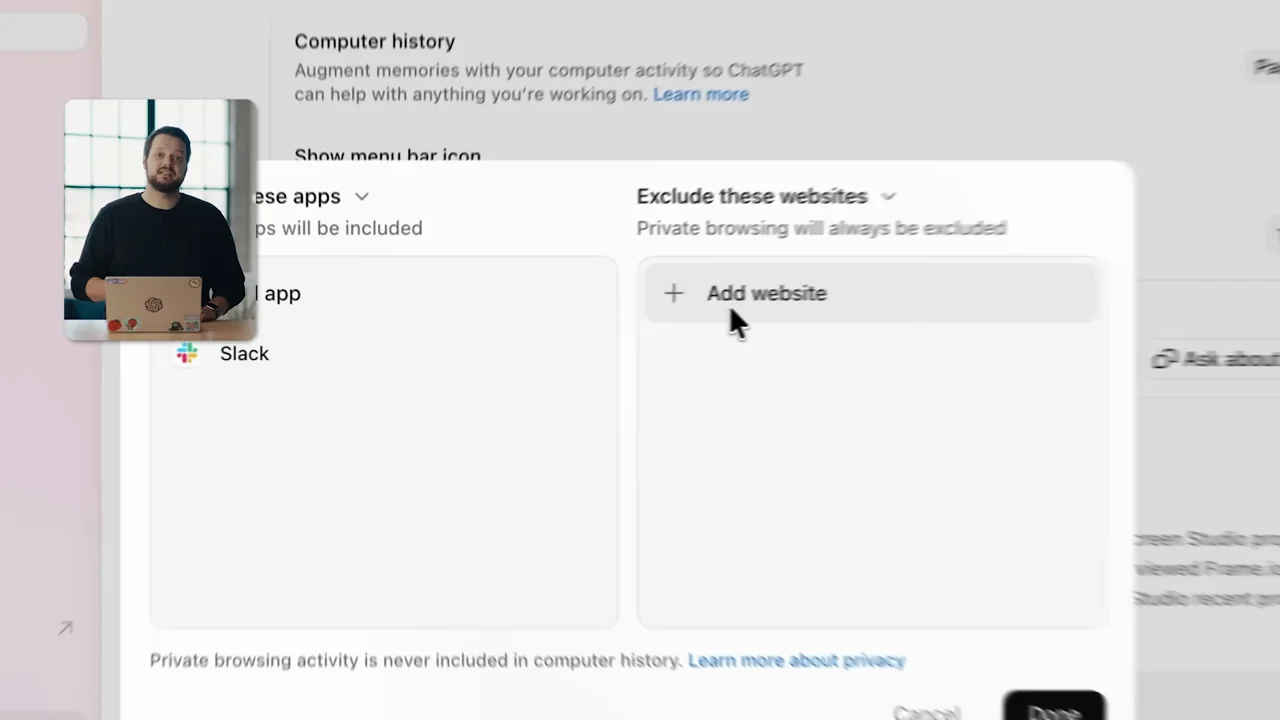
| Shot group 13 ≈ 02:06–02:10 App / browser screenWatch from here ↗ | Sample 02:08.000 | Website exclusions A settings panel shows excluded apps and an excluded website. | Two-column settings view. | Make recording boundaries concrete and inspectable. |
| Shot group 14 ≈ 02:10–02:14 People / environmentWatch from here ↗ | Sample 02:12.000 | Presenter bridge A short wide presenter shot separates settings from history review. | Human chapter break. | Use a concise visual transition instead of an extra face. |
| Shot group 15 ≈ 02:14–02:22 App / browser screenWatch from here ↗ | Sample 02:18.000 | History timeline A settings history list shows timestamped activity and suggested skills. | Vertical scroll through grouped activity records. | Expose what the system actually retained. |
| Shot group 16 ≈ 02:22–02:28 People / environmentWatch from here ↗ | Sample 02:24.000 | Close presenter bridge The presenter returns in a closer view. | Brief explanation beat. | Avoid duplicate screen motion when the explanation needs attention. |
| Shot group 17 ≈ 02:28–02:34 App / browser screenWatch from here ↗ | Sample 02:32.000 | Suggested-skill selection The history list returns and a suggested-skill link is selected. | Close crop on an actionable history entry. | Connect recorded context to an explicit next action. |
| Shot group 18 ≈ 02:34–02:38 App / browser screenWatch from here ↗ | Sample 02:36.000 | Skill-creation request The selected suggestion becomes a new task request. | Composer handoff retains the source of the suggestion. | Show the user initiating reuse rather than implying automatic conversion. |
| Shot group 19 ≈ 02:38–03:07 People / environmentWatch from here ↗ | Sample 02:54.000 | Presenter conclusion The presenter closes with wide and close views. | Extended human ending after the final UI task. | Leave the spoken conclusion to the supplied talking-head video. |
| Shot group 20 ≈ 03:07–03:10 Title / identityWatch from here ↗ | Sample 03:08.000 | End identity A white identity card closes the film. | Simple final reset. | Use the presentation's own finish. |