Human + product / 01:56 / Published 2025-02-04
OpenAI deep research in practice.
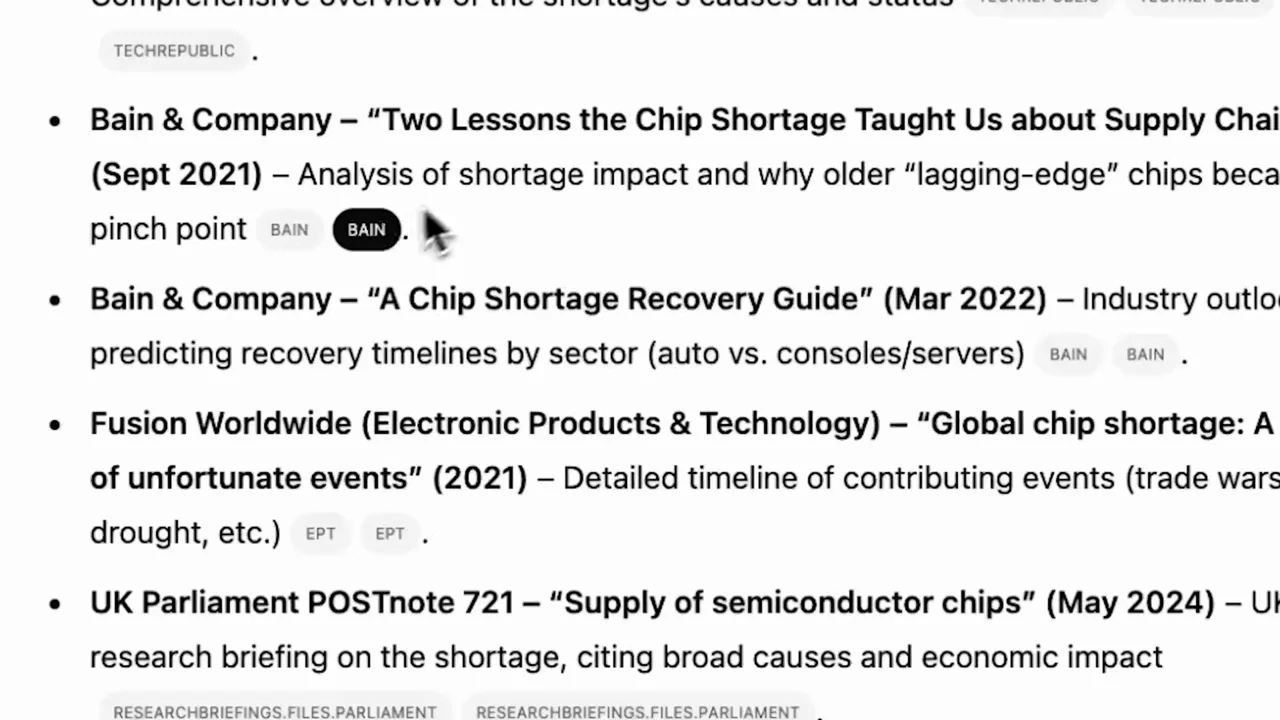
A customer-story format uses environment, interview, industry B-roll, and intermittent UI evidence. The most useful software details are the mode selector, research activity, a long report, and the close source list.
Useful to borrow
Link the work to a real question, retain a little research activity, and end with readable sources. A result's provenance can be a strong proof shot.
Do not infer
Do not reuse the customer identity, endorsement, industry footage, or imply a research duration from the film's compressed runtime.
19 shot groups.
Read across from the observed content to its treatment and possible adaptation. Enlarge the frame for detail.
Approximate study intervals; horizontal scrolling reveals all columns on small screens.
| Moment / source | Reference frame | What is on screen | Framing / edit | Useful adaptation |
|---|---|---|---|---|
| Shot group 01 ≈ 00:00–00:07 People / environmentWatch from here ↗ | Sample 00:04.000 | Environment Window and office shots establish a working setting. | Wide and medium environmental coverage. | Use context only when it explains the work. |
| Shot group 02 ≈ 00:07–00:10 App / browser screenWatch from here ↗ | Sample 00:08.000 | Composer / tools The deep-research choice is visible in the composer. | Centered application fragment. | Show the mode entry clearly. |
| Shot group 03 ≈ 00:10–00:17 People / environmentWatch from here ↗ | Sample 00:14.000 | Interview / title A person at a laptop leads into name and role coverage. | Live action with title overlays. | A customer-story reference, not an all-hands default. |
| Shot group 04 ≈ 00:17–00:25 People / environmentWatch from here ↗ | Sample 00:20.000 | Environment / portrait Portrait strips and office reception coverage establish context. | Collage and live-action cuts. | Do not borrow customer branding or endorsement. |
| Shot group 05 ≈ 00:25–00:32 People / environmentWatch from here ↗ | Sample 00:28.000 | Research materials Paper, a hand pointing at a screen, and files create work-context inserts. | Close tactile details. | A physical screen is not necessarily a product demo. |
| Shot group 06 ≈ 00:32–00:38 People / environmentWatch from here ↗ | Sample 00:36.000 | Physical laptop Laptop use appears in varied shot sizes. | Small framed shots and wider coverage. | Keep the relevant action, not ornamental B-roll. |
| Shot group 07 ≈ 00:38–00:42 App / browser screenWatch from here ↗ | Sample 00:40.000 | Composer / tools The research mode becomes visibly selected. | Stable composer crop. | Show the state change that starts the task. |
| Shot group 08 ≈ 00:42–00:45 People / environmentWatch from here ↗ | Sample 00:44.000 | Physical laptop Hands and a wide laptop shot bridge into the task. | Short live-action inserts. | The user's separate recording can supply the human context. |
| Shot group 09 ≈ 00:45–00:49 App / browser screenWatch from here ↗ | Sample 00:48.000 | Research activity The conversation shows a research sidebar, then a close reading-status detail. | Whole response into activity crop. | Make work-in-progress specific rather than decorative. |
| Shot group 10 ≈ 00:49–01:06 People / environmentWatch from here ↗ | Sample 01:00.000 | Industry B-roll Interview and city coverage lead to semiconductor manufacturing imagery. | Multi-shot contextual montage. | Only use footage that genuinely belongs to the topic. |
| Shot group 11 ≈ 01:06–01:08 People / environmentWatch from here ↗ | Sample 01:06.000 | Interview The speaker returns before another screen example. | Tight interview shot. | Avoid a redundant second presenter in the companion video. |
| Shot group 12 ≈ 01:08–01:12 App / browser screenWatch from here ↗ | Sample 01:10.000 | Physical laptop / composer An over-the-shoulder laptop shows a research request. | Oblique screen framing with the user in foreground. | Useful for context, weaker for small-text readability. |
| Shot group 13 ≈ 01:12–01:19 People / environmentWatch from here ↗ | Sample 01:16.000 | Prompt overlay Large prompt-like text overlays the person and office. | Text over live action, not a literal app screen. | Treat editorial annotations as annotations, not UI evidence. |
| Shot group 14 ≈ 01:19–01:23 App / browser screenWatch from here ↗ | Sample 01:22.000 | Research report A long research response fills the software view. | Direct screen view with visible report progression. | Show report structure rather than every paragraph. |
| Shot group 15 ≈ 01:23–01:25 App / browser screenWatch from here ↗ | Sample 01:24.000 | Physical laptop / report The report is seen on the user's laptop. | Over-the-shoulder result insert. | Use it for ownership/context, not detailed reading. |
| Shot group 16 ≈ 01:25–01:27 People / environmentWatch from here ↗ | Sample 01:26.000 | Interview A short speaker beat separates report details. | Medium camera coverage. | The external talking-head stream can perform this role. |
| Shot group 17 ≈ 01:27–01:31 App / browser screenWatch from here ↗ | Sample 01:30.000 | Citations / sources The sources section becomes a readable close-up. | Report overview into source-list detail. | Proof can be traceability, not just a polished result. |
| Shot group 18 ≈ 01:31–01:52 People / environmentWatch from here ↗ | Sample 01:44.000 | Interview / environment Interview, stairs, and outdoor portraits conclude the story. | Multiple live-action and framed-portrait cuts. | Study the breathing room, not the specific footage. |
| Shot group 19 ≈ 01:52–01:56 Title / identityWatch from here ↗ | Sample 01:54.000 | End card A source wordmark sits over the office view. | Quiet environmental ending. | A settled ending need not be a complicated animation. |