Presenter demo / 01:14 / Published 2025-03-25
Text Rendering with 4o Image Generation
A detailed infographic prompt leads to close and whole-screen views of a prism diagram, framed by an interview and a filmed laptop.
Useful to borrow
Reveal a dense artifact first at reading scale, then return to the whole composition.
Do not infer
The source demonstrates image appearance; this study does not validate the diagram's physics or all rendered text.
7 shot groups.
Read across from the observed content to its treatment and possible adaptation. Enlarge the frame for detail.
Approximate study intervals; horizontal scrolling reveals all columns on small screens.
| Moment / source | Reference frame | What is on screen | Framing / edit | Useful adaptation |
|---|---|---|---|---|
| Shot group 01 ≈ 00:00–00:16 Title / identityWatch from here ↗ | Sample 00:12.000 | Text-rendering topic Couch and presenter shots introduce the text-rendering title. | Human scene into topic card. | Give the output a specific inspection focus. |
| Shot group 02 ≈ 00:16–00:28 People / environmentWatch from here ↗ | Sample 00:24.000 | Presenter setup An interview-style shot precedes the screen demonstration. | Stable human framing. | Use people to establish context, not to substitute for output evidence. |
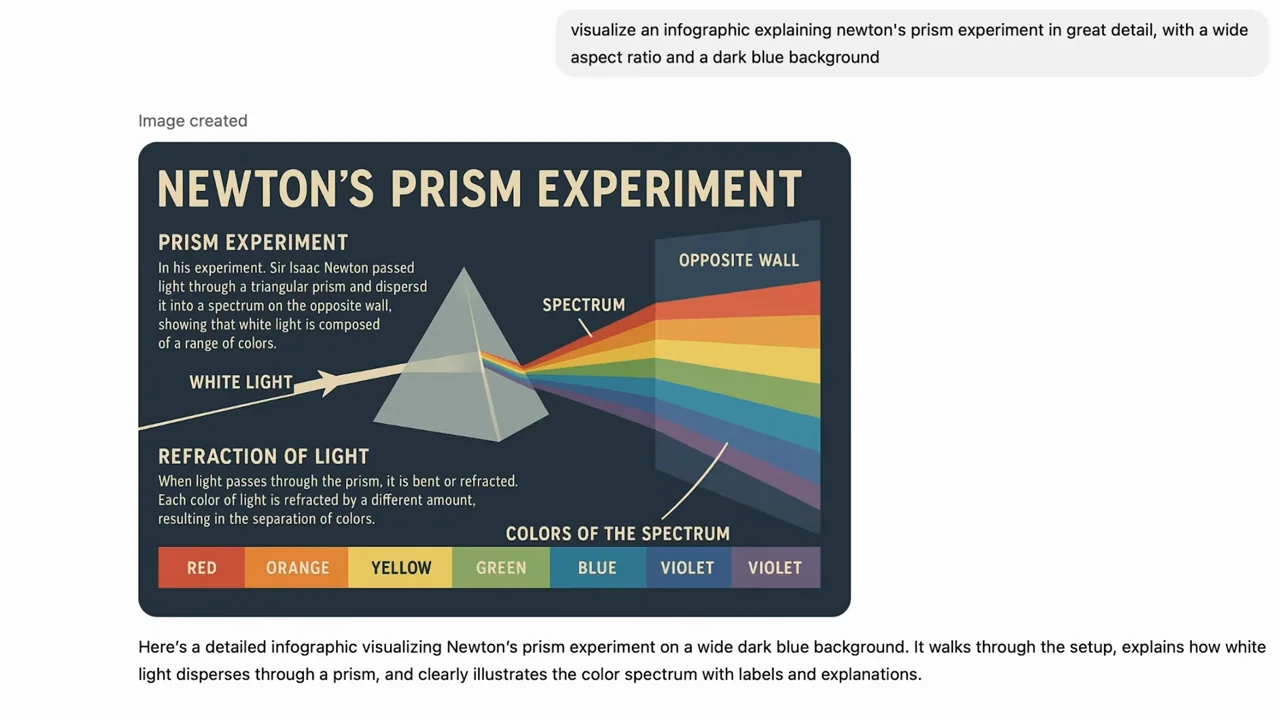
| Shot group 03 ≈ 00:28–00:36 App / browser screenWatch from here ↗ | Sample 00:32.000 | Infographic prompt A close composer request specifies a prism experiment and a dark-blue visual treatment. | Large readable input. | Expose the important visual constraints. |
| Shot group 04 ≈ 00:36–00:48 App / browser screenWatch from here ↗ | Sample 00:40.000 | Result detail A presenter insert leads into a finishing-state image and a closer prism diagram. | Tight result reveal. | Let viewers inspect text and diagram elements. |
| Shot group 05 ≈ 00:48–00:52 App / browser screenWatch from here ↗ | Sample 00:48.000 | Whole result The complete infographic appears inside the conversation. | Detail-to-context reset. | Show the artifact's full layout. |
| Shot group 06 ≈ 00:52–01:08 People / environmentWatch from here ↗ | Sample 01:00.000 | Physical-screen context The presenter and filmed laptop show the infographic and another image. | Human and device inserts. | Keep these distinct from legible interface studies. |
| Shot group 07 ≈ 01:08–01:14 People / environmentWatch from here ↗ | Sample 01:12.000 | Presenter ending A wordmark overlays the closing presenter shot. | Identity on live footage. | End without adding another workflow claim. |