Presenter demo / 02:31 / Published 2026-04-21
Aspect Ratios & Resolution with ChatGPT Images 2.0
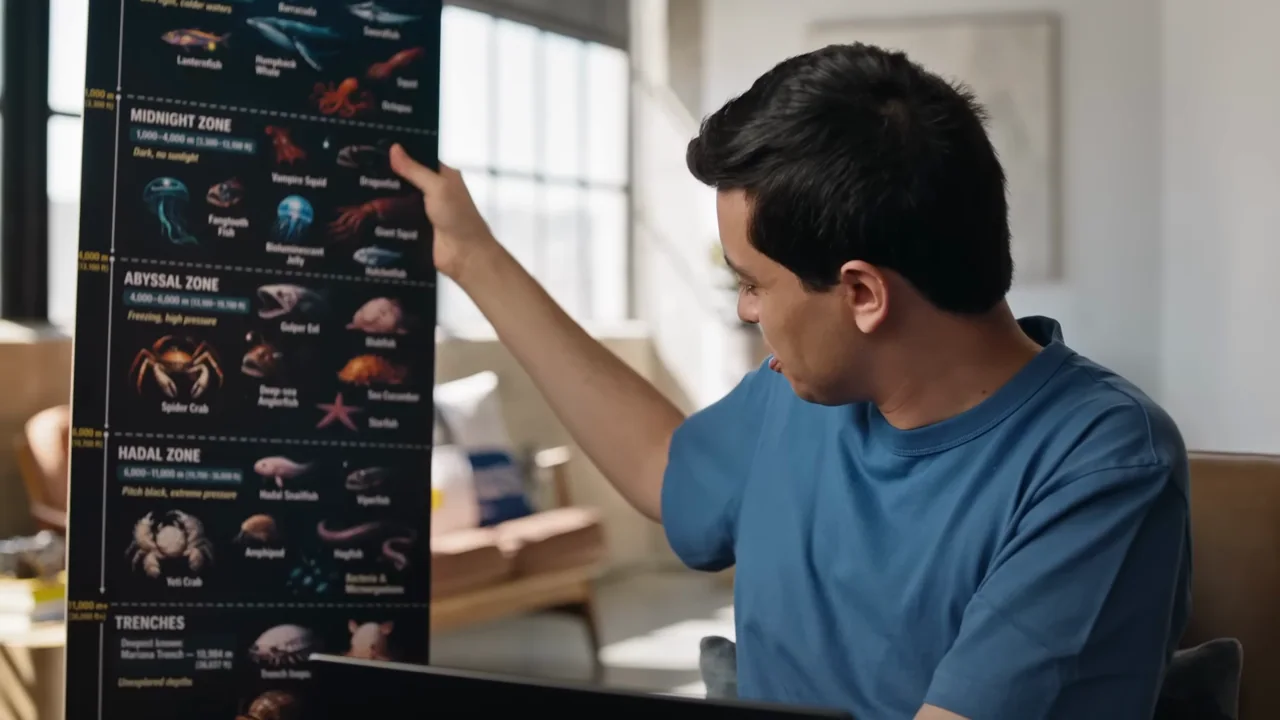
Aspect ratios are explained through a tall infographic, a physical print, texture detail, and a panoramic viewer.
Useful to borrow
Use real scale and different containers to explain output dimensions.
Do not infer
Neither a filmed print nor a zoomed texture independently verifies source resolution or factual content.
8 shot groups.
Read across from the observed content to its treatment and possible adaptation. Enlarge the frame for detail.
Approximate study intervals; horizontal scrolling reveals all columns on small screens.
| Moment / source | Reference frame | What is on screen | Framing / edit | Useful adaptation |
|---|---|---|---|---|
| Shot group 01 ≈ 00:00–00:30 Graphic interludeWatch from here ↗ | Sample 00:20.000 | Aspect-ratio setup Interview coverage includes three differently proportioned rectangles. | Simple explanatory geometry. | Introduce format before content. |
| Shot group 02 ≈ 00:30–01:02 Isolated outputWatch from here ↗ | Sample 00:56.000 | Tall infographic Laptop input leads to a narrow image and an enlarged ocean-depth detail. | Whole tall output then crop. | Retain orientation while making detail readable. |
| Shot group 03 ≈ 01:02–01:20 Isolated outputWatch from here ↗ | Sample 01:08.000 | Physical print The presenter holds a long print; another poster appears directly. | Physical scale reference. | Use a real object when dimensions matter. |
| Shot group 04 ≈ 01:20–01:36 Isolated outputWatch from here ↗ | Sample 01:28.000 | Texture inspection Rice-like texture appears close, then as a smaller full image. | Detail-to-whole comparison. | Distinguish visible texture from a resolution specification. |
| Shot group 05 ≈ 01:36–01:58 App / browser screenWatch from here ↗ | Sample 01:52.000 | Panorama request Interview and laptop coverage lead to a panoramic-image prompt. | Clean composer insert. | State the requested format. |
| Shot group 06 ≈ 01:58–02:10 App / browser screenWatch from here ↗ | Sample 02:04.000 | Viewer preparation A panorama result is followed by a conversation view. | Result and implementation context remain distinct. | Do not call a generated viewer a built-in product feature. |
| Shot group 07 ≈ 02:10–02:26 App / browser screenWatch from here ↗ | Sample 02:12.000 | Interactive panorama A viewer with orientation readouts appears, followed by laptop and panoramic-strip views. | Direct viewer plus physical device proof. | Show an interaction that explains the format. |
| Shot group 08 ≈ 02:26–02:31 Title / identityWatch from here ↗ | Sample 02:28.000 | Brand ending White wordmark. | Minimal close. | Use an original identity. |