Presenter demo / 02:07 / Published 2026-08-27
How to Build a Personalized Meal Planner with ChatGPT Work
A personal planning task becomes a colorful site, grocery handoff, mobile feedback form, recurring reminder, and draft message. Each stage adds a different interaction surface.
Useful to borrow
Show a useful initial result, then add one capability at a time. Use a phone-sized preview to prove the layout works beyond the desktop pane.
Do not infer
This study does not validate nutrition, allergy safety, or medical advice. Grocery-cart preparation is not a completed purchase; the clinical message remains a draft. Use safe, fictional demo data in production.
19 shot groups.
Read across from the observed content to its treatment and possible adaptation. Enlarge the frame for detail.
Approximate study intervals; horizontal scrolling reveals all columns on small screens.
| Moment / source | Reference frame | What is on screen | Framing / edit | Useful adaptation |
|---|---|---|---|---|
| Shot group 01 ≈ 00:00–00:04 People / environmentWatch from here ↗ | Sample 00:02.000 | Laptop title opening A physical laptop shot carries the meal-planning topic. | Close object view and large title. | Establish the task category before showing controls. |
| Shot group 02 ≈ 00:04–00:26 People / environmentWatch from here ↗ | Sample 00:14.000 | Presenter setup Wide and close presenter shots introduce the personal workflow. | Extended human explanation. | Keep spoken context in the separate talking-head asset. |
| Shot group 03 ≈ 00:26–00:34 App / browser screenWatch from here ↗ | Sample 00:30.000 | Planning request A composer asks for a weekly plan using existing preferences and notes. | Floating task window against a scenic desktop. | Make the input constraints visible. |
| Shot group 04 ≈ 00:34–00:39 App / browser screenWatch from here ↗ | Sample 00:36.000 | Context attachment A screen-context attachment appears with an overlaid keyboard instruction. | App window shifts aside to make room for instructional type. | Show how the source is attached without copying platform-specific shortcuts blindly. |
| Shot group 05 ≈ 00:39–00:44 App / browser screenWatch from here ↗ | Sample 00:42.000 | Initial plan result A meal table and practical notes appear in the task response. | Result held in the same floating window. | Inspect the first usable output before adding complexity. |
| Shot group 06 ≈ 00:44–01:00 App / browser screenWatch from here ↗ | Sample 00:54.000 | Site-building follow-up A longer request asks to turn the plan into a shareable tracking site. | Full app context retains the earlier plan above the composer. | Show the new deliverable's requirements in one coherent beat. |
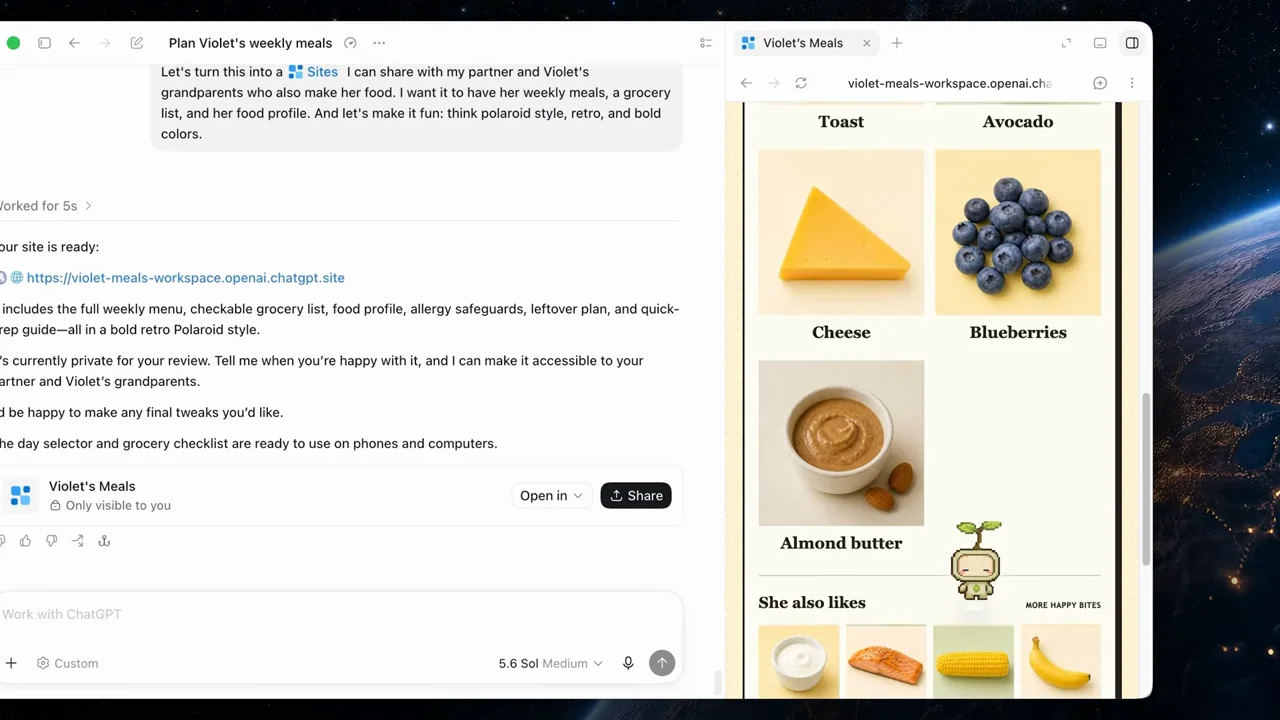
| Shot group 07 ≈ 01:00–01:04 App / browser screenWatch from here ↗ | Sample 01:02.000 | Generated meal-site cover A bright meal-planning site opens beside the conversation. | Strong output identity contrasts with the neutral host app. | Keep generated-site identity distinct from the product shell. |
| Shot group 08 ≈ 01:04–01:08 App / browser screenWatch from here ↗ | Sample 01:06.000 | Preferences and food pages The site shows allergy notes and a visual food collection. | Vertical artifact navigation. | Show relevant interior content using safe fictional personal data. |
| Shot group 09 ≈ 01:08–01:12 App / browser screenWatch from here ↗ | Sample 01:10.000 | Grocery-list request A grocery checklist is visible while a cart-building request is submitted. | Conversation and checklist remain side by side. | Connect the action to the selected list. |
| Shot group 10 ≈ 01:12–01:18 App / browser screenWatch from here ↗ | Sample 01:14.000 | Prepared grocery cart A cart summary and checkout control appear beside the site. | Readable handoff card and external-checkout affordance. | Stop the claim at cart preparation unless a purchase is actually shown. |
| Shot group 11 ≈ 01:18–01:26 App / browser screenWatch from here ↗ | Sample 01:22.000 | Feedback-form revision A follow-up asks to add meal ratings and notes. | Close composer crop followed by a build response. | Add one testable capability rather than an unexplained visual redesign. |
| Shot group 12 ≈ 01:26–01:32 App / browser screenWatch from here ↗ | Sample 01:30.000 | Mobile feedback form A phone-sized site preview shows rating choices and a notes field. | Device mockup beside the presenter. | Verify mobile interaction, not just desktop appearance. |
| Shot group 13 ≈ 01:32–01:38 App / browser screenWatch from here ↗ | Sample 01:36.000 | Reminder request The conversation asks for a recurring review of the saved feedback. | Prior site artifact remains above the follow-up. | Connect the recurrence to a concrete existing output. |
| Shot group 14 ≈ 01:38–01:42 App / browser screenWatch from here ↗ | Sample 01:40.000 | Scheduled reminder result A recurring reminder card appears in the conversation. | Compact saved-task artifact. | Show the actual configured reminder without claiming a future run. |
| Shot group 15 ≈ 01:42–01:48 App / browser screenWatch from here ↗ | Sample 01:46.000 | Draft-message request A follow-up asks for a message based on recorded feedback. | Task context remains visible. | Keep sensitive content fictional and maintain the draft boundary. |
| Shot group 16 ≈ 01:48–01:52 App / browser screenWatch from here ↗ | Sample 01:50.000 | Unsent message draft A draft message opens with a visible send control. | Message card inside the conversation. | Show a reviewable draft, not an unobserved send. |
| Shot group 17 ≈ 01:52–02:00 People / environmentWatch from here ↗ | Sample 01:56.000 | Presenter conclusion The presenter closes the explanation at the desk. | Stable wide human finish. | Leave the spoken close to the supplied recording. |
| Shot group 18 ≈ 02:00–02:05 People / environmentWatch from here ↗ | Sample 02:04.000 | Physical exit The presenter picks up the laptop and leaves the desk. | Action-led closing shot. | Do not invent an exit or wave missing from the user's footage. |
| Shot group 19 ≈ 02:05–02:07 Title / identityWatch from here ↗ | Sample 02:06.000 | End identity A white identity card ends the film. | Clean final visual. | Use the presentation's own ending while the talking head retains its buffer. |