Presenter demo / 02:45 / Published 2026-08-28
Plugins & Skills
A calendar-and-mail task progresses from connection setup to proposed event details, explicit approval, a meeting brief, and a reusable skill.
Useful to borrow
Keep the source context, approval, saved result, and reusable instructions as separate beats. A repeated workflow is clearer when each stage has a visible artifact.
Do not infer
A conversation's scheduling confirmation is not a full independent calendar verification. Avoid duplicating the presenter inset or treating every long text hold as a new example.
25 shot groups.
Read across from the observed content to its treatment and possible adaptation. Enlarge the frame for detail.
Approximate study intervals; horizontal scrolling reveals all columns on small screens.
| Moment / source | Reference frame | What is on screen | Framing / edit | Useful adaptation |
|---|---|---|---|---|
| Shot group 01 ≈ 00:00–00:06 People / environmentWatch from here ↗ | Sample 00:04.000 | Topic opening Overhead and laptop shots carry the plugins-and-skills title. | Environmental opening followed by a close object view. | Establish the chapter before entering configuration screens. |
| Shot group 02 ≈ 00:06–00:12 People / environmentWatch from here ↗ | Sample 00:08.000 | Presenter introduction The presenter explains the use case at the desk. | Wide human framing. | Keep spoken setup in the separate recording. |
| Shot group 03 ≈ 00:12–00:16 App / browser screenWatch from here ↗ | Sample 00:14.000 | Calendar source context A busy weekly calendar establishes the scheduling problem. | Whole browser view with a presenter inset. | Show the real constraints before suggesting a solution. |
| Shot group 04 ≈ 00:16–00:22 App / browser screenWatch from here ↗ | Sample 00:18.000 | Mail source context A client email thread supplies project context. | Readable browser crop. | Show the source of details used later in the task. |
| Shot group 05 ≈ 00:22–00:36 People / environmentWatch from here ↗ | Sample 00:28.000 | Presenter explanation Wide and close presenter shots connect the source examples to the workflow. | Human bridge between source context and setup. | Use the narration rather than redundant UI motion. |
| Shot group 06 ≈ 00:36–00:40 App / browser screenWatch from here ↗ | Sample 00:38.000 | Desktop and mobile entry Desktop and phone entry screens show the work surface. | Brief device-format comparison. | Clarify which surface is being demonstrated. |
| Shot group 07 ≈ 00:40–00:44 People / environmentWatch from here ↗ | Sample 00:42.000 | Setup bridge A close presenter view precedes connection controls. | Short human pause. | Make a clear transition into setup. |
| Shot group 08 ≈ 00:44–00:48 App / browser screenWatch from here ↗ | Sample 00:46.000 | Mail plugin detail An integration page displays its task description and connection status. | Whole page followed by a control-focused crop. | Show the setup requirement before relying on the integration. |
| Shot group 09 ≈ 00:48–00:52 People / environmentWatch from here ↗ | Sample 00:50.000 | Presenter bridge The presenter returns briefly. | Wide desk shot. | Do not stretch the previous settings screen for filler. |
| Shot group 10 ≈ 00:52–00:58 App / browser screenWatch from here ↗ | Sample 00:56.000 | Plugin catalog navigation The catalog is scrolled to the calendar integration. | Navigation and categorized tools stay visible. | Show a discoverable path to the feature. |
| Shot group 11 ≈ 00:58–01:02 App / browser screenWatch from here ↗ | Sample 01:00.000 | Calendar authorization An account-choice page leads back to connected calendar details. | External consent then in-app confirmation. | Keep the authorization boundary visible. |
| Shot group 12 ≈ 01:02–01:06 People / environmentWatch from here ↗ | Sample 01:04.000 | Task introduction The presenter introduces the first connected task. | Close human shot. | Let the talking head state the task's purpose. |
| Shot group 13 ≈ 01:06–01:14 App / browser screenWatch from here ↗ | Sample 01:12.000 | Availability request and result A calendar request returns candidate meeting times. | Composer-to-conversation sequence. | Show a small useful result before adding more context. |
| Shot group 14 ≈ 01:14–01:26 App / browser screenWatch from here ↗ | Sample 01:22.000 | Mail-context follow-up A second request asks to find the client thread and prepare a meeting using it. | Close composer view then wider processing state. | Connect the new source to the scheduling task. |
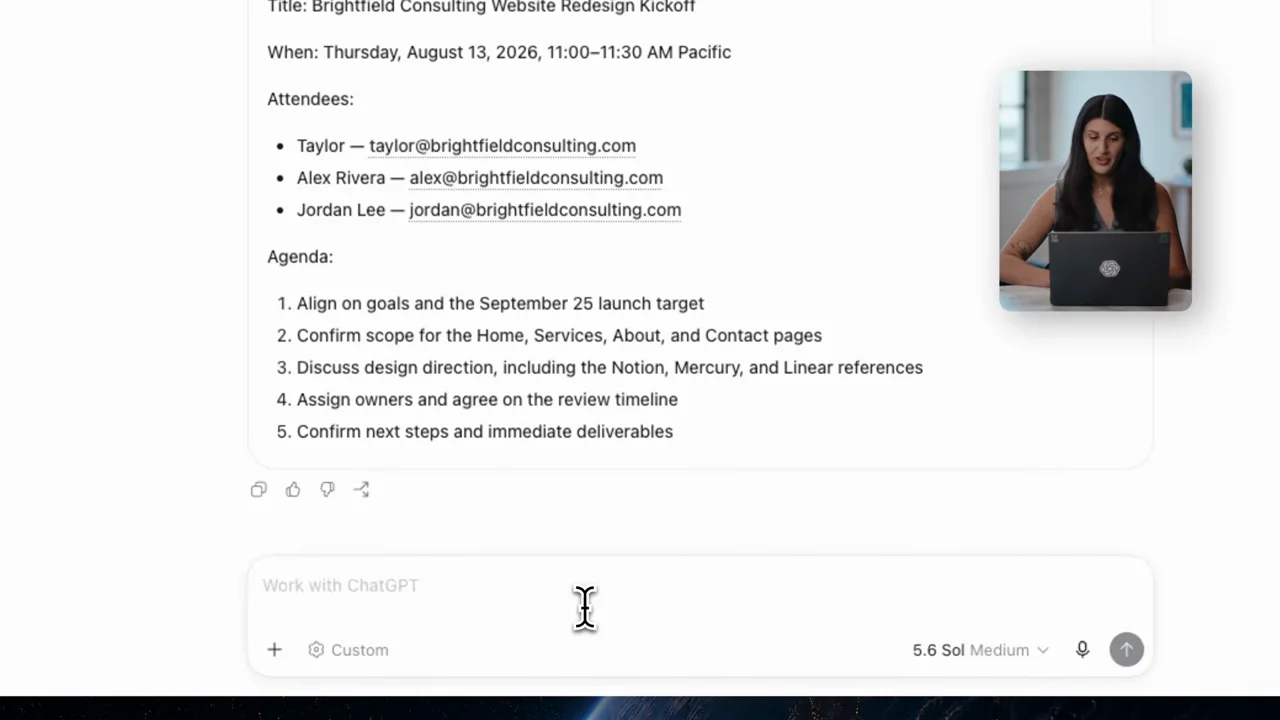
| Shot group 15 ≈ 01:26–01:34 App / browser screenWatch from here ↗ | Sample 01:30.000 | Proposed meeting details The conversation lists a time, attendees, and agenda. | Close result crop makes approval information readable. | Let viewers inspect consequential details before the action. |
| Shot group 16 ≈ 01:34–01:40 App / browser screenWatch from here ↗ | Sample 01:38.000 | Scheduling approval A short approval is followed by a scheduling response. | Request and confirmation remain in one conversation. | Preserve an explicit approval step. |
| Shot group 17 ≈ 01:40–01:44 People / environmentWatch from here ↗ | Sample 01:42.000 | Presenter bridge A short desk shot separates scheduling from preparation. | Human transition. | Use a content reset before the next output. |
| Shot group 18 ≈ 01:44–01:52 App / browser screenWatch from here ↗ | Sample 01:48.000 | Meeting-brief request A follow-up asks for a structured brief using the thread and event. | Prior confirmation remains above the composer. | Show the earlier result becoming input to the next task. |
| Shot group 19 ≈ 01:52–01:58 App / browser screenWatch from here ↗ | Sample 01:56.000 | Meeting-brief result The brief exposes objectives, decisions, risks, and next steps. | Vertical reading crop over a structured response. | Inspect actionable interior sections, not only the title. |
| Shot group 20 ≈ 01:58–02:12 People / environmentWatch from here ↗ | Sample 02:06.000 | Reuse explanation The presenter explains the next reuse step. | Wide and close human views. | Keep the explanation with the talking head. |
| Shot group 21 ≈ 02:12–02:18 App / browser screenWatch from here ↗ | Sample 02:16.000 | Save-as-skill request The workflow is submitted as a reusable skill request. | Conversation retains the completed brief as context. | Show what is being made repeatable. |
| Shot group 22 ≈ 02:18–02:22 People / environmentWatch from here ↗ | Sample 02:20.000 | Presenter pause The speaker appears briefly while the workflow advances. | Short human bridge. | Avoid interpreting edited waiting time as product speed. |
| Shot group 23 ≈ 02:22–02:28 App / browser screenWatch from here ↗ | Sample 02:26.000 | Skill invocation and output A saved skill is invoked and a structured meeting result appears. | Saved instruction followed by a new execution result. | Prove reuse with another visible task state. |
| Shot group 24 ≈ 02:28–02:42 People / environmentWatch from here ↗ | Sample 02:36.000 | Presenter conclusion Wide and close shots close the explanation. | Human ending after the final artifact. | Leave the concluding performance to the supplied recording. |
| Shot group 25 ≈ 02:42–02:45 Title / identityWatch from here ↗ | Sample 02:44.000 | End identity A white identity card ends the film. | Minimal final reset. | Use original presentation identity. |