Presenter demo / 02:09 / Published 2026-08-28
Scheduled Tasks
A meeting-preparation task is tested once, converted into a schedule, inspected in the task list, and refined with a reusable skill.
Useful to borrow
Demonstrate the one-off result before scheduling it. Show the saved recurrence and management surface, not just a conversational promise.
Do not infer
A visible recurring task does not prove a future run succeeded. The presenter-overlay prompt examples near the end are task suggestions, not completed workflows.
20 shot groups.
Read across from the observed content to its treatment and possible adaptation. Enlarge the frame for detail.
Approximate study intervals; horizontal scrolling reveals all columns on small screens.
| Moment / source | Reference frame | What is on screen | Framing / edit | Useful adaptation |
|---|---|---|---|---|
| Shot group 01 ≈ 00:00–00:04 People / environmentWatch from here ↗ | Sample 00:02.000 | Overhead topic opening A room-wide overhead view introduces scheduled tasks with large type. | Environmental establishment. | Use a clear title before a settings-heavy demo. |
| Shot group 02 ≈ 00:04–00:18 People / environmentWatch from here ↗ | Sample 00:10.000 | Presenter introduction Wide and close presenter shots establish the use case. | Alternating desk-camera scales. | Keep spoken context in the talking-head asset. |
| Shot group 03 ≈ 00:18–00:30 People / environmentWatch from here ↗ | Sample 00:20.000 | Recurrence explanation Frequency labels appear beside the presenter before the screen demo. | Short text overlays over a human shot. | Make recurrence concepts readable without showing unconfigured controls. |
| Shot group 04 ≈ 00:30–00:34 App / browser screenWatch from here ↗ | Sample 00:32.000 | Desktop and phone entry Brief desktop and mobile views show the app's work entry point. | Matched task category across device formats. | Identify the supported surface before the workflow begins. |
| Shot group 05 ≈ 00:34–00:40 People / environmentWatch from here ↗ | Sample 00:36.000 | Setup bridge The presenter prepares the demonstration. | Wide desk hold. | Cut unnecessary setup delay from the companion presentation. |
| Shot group 06 ≈ 00:40–00:47 App / browser screenWatch from here ↗ | Sample 00:44.000 | Plugin setup The integration catalog and a connection detail page are shown. | Discovery view followed by setup controls. | Expose required integrations before relying on them. |
| Shot group 07 ≈ 00:47–00:50 App / browser screenWatch from here ↗ | Sample 00:48.000 | Account authorization An account-choice page opens for the connection. | External authorization surface stays recognizable. | Retain meaningful authorization steps and use safe demo accounts. |
| Shot group 08 ≈ 00:50–00:54 People / environmentWatch from here ↗ | Sample 00:52.000 | Presenter bridge A short speaker view leads into the task request. | Wide human shot. | Use a concise visual reset between setup and use. |
| Shot group 09 ≈ 00:54–01:01 App / browser screenWatch from here ↗ | Sample 00:58.000 | Meeting-preparation request A prompt asks for meeting briefs using calendar and mail sources. | Close composer view shows source chips. | Make the requested inputs and output explicit. |
| Shot group 10 ≈ 01:01–01:08 App / browser screenWatch from here ↗ | Sample 01:06.000 | One-off brief result The conversation returns a brief and opens it in a side pane. | Task and document share the frame. | Validate the task once before making it recurring. |
| Shot group 11 ≈ 01:08–01:12 App / browser screenWatch from here ↗ | Sample 01:10.000 | Recurrence follow-up A short follow-up asks to repeat the task on weekday mornings. | Isolated composer crop. | Show the exact recurrence request. |
| Shot group 12 ≈ 01:12–01:16 App / browser screenWatch from here ↗ | Sample 01:14.000 | Schedule confirmation A task confirmation appears in the conversation. | Wider task context after the request. | Follow the promise with an inspectable saved configuration. |
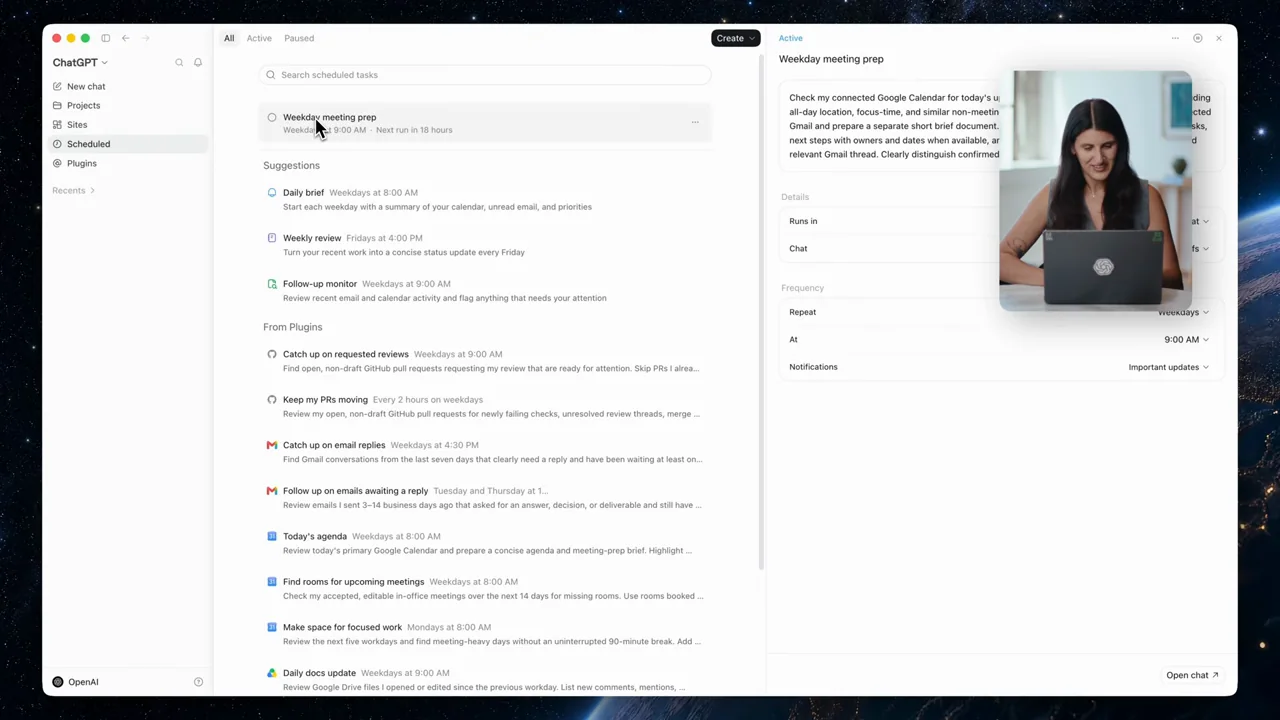
| Shot group 13 ≈ 01:16–01:20 App / browser screenWatch from here ↗ | Sample 01:18.000 | Scheduled-task list Navigation opens the list of recurring tasks. | Sidebar entry leads to the management surface. | Show where the task can be found later. |
| Shot group 14 ≈ 01:20–01:26 App / browser screenWatch from here ↗ | Sample 01:22.000 | Task settings The selected task exposes its instructions and recurrence details. | List and detail pane remain visible together. | Verify the actual saved schedule rather than the prompt alone. |
| Shot group 15 ≈ 01:26–01:36 People / environmentWatch from here ↗ | Sample 01:30.000 | Presenter explanation The speaker returns before refining the task. | Wide and close human views. | Let the supplied narration explain the refinement. |
| Shot group 16 ≈ 01:36–01:40 App / browser screenWatch from here ↗ | Sample 01:38.000 | Reusable-skill refinement A follow-up references a meeting-preparation skill. | Skill selection appears below the existing schedule confirmation. | Show how output format can be made repeatable. |
| Shot group 17 ≈ 01:40–01:44 App / browser screenWatch from here ↗ | Sample 01:42.000 | Refined brief preview The updated brief opens beside the conversation. | Document result validates the refinement. | Inspect the actual changed output. |
| Shot group 18 ≈ 01:44–01:59 App / browser screenWatch from here ↗ | Sample 01:52.000 | Suggested recurring prompts Small composer examples overlay the presenter for several other task ideas. | Illustrative prompt montage, not completed-task evidence. | Label suggestions as suggestions rather than demonstrated results. |
| Shot group 19 ≈ 01:59–02:07 People / environmentWatch from here ↗ | Sample 02:04.000 | Presenter ending The presenter closes the explanation. | Stable human finish. | Preserve the user's own closing performance. |
| Shot group 20 ≈ 02:07–02:09 Title / identityWatch from here ↗ | Sample 02:08.000 | End identity The film ends on a white identity card. | Clean final reset. | Use original presentation identity. |