Presenter demo / 03:17 / Published 2026-08-28
Create Slides, Docs, and Templates
A meeting transcript becomes a structured document, a leadership deck, reusable templates, and a second set of outputs. The workflow distinguishes source, format, and reuse.
Useful to borrow
Show the original material, inspect the first output, then use it as the next input. Verify template reuse with changed content in the same structure.
Do not infer
The film's generated slide deck is not the all-hands deliverable: this project still needs a timed presentation video. Preserve actual source constraints and do not copy demo metrics.
32 shot groups.
Read across from the observed content to its treatment and possible adaptation. Enlarge the frame for detail.
Approximate study intervals; horizontal scrolling reveals all columns on small screens.
| Moment / source | Reference frame | What is on screen | Framing / edit | Useful adaptation |
|---|---|---|---|---|
| Shot group 01 ≈ 00:00–00:04 People / environmentWatch from here ↗ | Sample 00:02.000 | Laptop title opening A physical laptop shot carries the slides-and-documents title. | Close object opening. | Use a concise topic introduction. |
| Shot group 02 ≈ 00:04–00:10 People / environmentWatch from here ↗ | Sample 00:08.000 | Presenter setup The presenter introduces the source-to-output workflow. | Wide desk framing. | Leave the spoken introduction to the supplied recording. |
| Shot group 03 ≈ 00:10–00:12 Isolated outputWatch from here ↗ | Sample 00:10.000 | Transcript teaser A text-document excerpt overlays the presenter. | Isolated source-text illustration without a full editor. | Label source material distinctly from a finished output. |
| Shot group 04 ≈ 00:12–00:22 People / environmentWatch from here ↗ | Sample 00:18.000 | Presenter explanation Wide and close shots continue the setup. | Alternating human scales. | Avoid unnecessary UI animation under a conceptual explanation. |
| Shot group 05 ≈ 00:22–00:24 Isolated outputWatch from here ↗ | Sample 00:22.000 | Summary teaser A structured meeting summary appears as an isolated overlay. | Compact document preview. | Show the transformation's intended output format. |
| Shot group 06 ≈ 00:24–00:26 App / browser screenWatch from here ↗ | Sample 00:24.000 | Deck teaser A small slide-editor window overlays the presenter. | Recognizable editor chrome around the slide. | Distinguish an editable deck from a static visual. |
| Shot group 07 ≈ 00:26–00:32 People / environmentWatch from here ↗ | Sample 00:30.000 | Setup bridge The presenter prepares to enter the app. | Close then wide human view. | Keep the transition into the demonstration clear. |
| Shot group 08 ≈ 00:32–00:36 App / browser screenWatch from here ↗ | Sample 00:34.000 | Desktop work entry The browser switches to the work composer. | Control crop then whole-window establishment. | Show the starting surface before selecting tools. |
| Shot group 09 ≈ 00:36–00:40 App / browser screenWatch from here ↗ | Sample 00:38.000 | Mobile work entry A phone view shows the equivalent entry mode. | Full device followed by a closer top-screen view. | Use a device comparison only when it supports the task. |
| Shot group 10 ≈ 00:40–00:46 People / environmentWatch from here ↗ | Sample 00:44.000 | Connection introduction The presenter explains the integration setup. | Human bridge. | Separate setup from the creative workflow. |
| Shot group 11 ≈ 00:46–00:54 App / browser screenWatch from here ↗ | Sample 00:50.000 | Drive plugin discovery The catalog is searched and the file integration is selected. | Close navigation and result-list framing. | Show the feature's actual discovery path. |
| Shot group 12 ≈ 00:54–01:00 App / browser screenWatch from here ↗ | Sample 00:58.000 | Drive connection controls A connection dialog leads to the integration's configured details. | Modal-to-detail transition. | Retain a meaningful connection step. |
| Shot group 13 ≈ 01:00–01:02 People / environmentWatch from here ↗ | Sample 01:00.000 | Source introduction The presenter briefly returns before opening the transcript. | Short desk shot. | Name the source before displaying dense text. |
| Shot group 14 ≈ 01:02–01:06 App / browser screenWatch from here ↗ | Sample 01:04.000 | Meeting transcript source A transcript is opened in Google Docs and scrolled. | Full editor context around dense source text. | Establish where the information came from. |
| Shot group 15 ≈ 01:06–01:18 People / environmentWatch from here ↗ | Sample 01:12.000 | Output explanation The speaker explains the requested document structure. | Wide and close human shots. | Let the narration describe constraints before showing the prompt. |
| Shot group 16 ≈ 01:18–01:40 App / browser screenWatch from here ↗ | Sample 01:30.000 | Structured-summary request A prompt specifies sections, concise formatting, decisions, and action items. | Long composer-authoring beat. | Show essential constraints; compress typing without changing meaning. |
| Shot group 17 ≈ 01:40–01:46 App / browser screenWatch from here ↗ | Sample 01:44.000 | Document creation result The conversation returns a summary document link. | Task response before the output opens. | Expose the saved artifact, not only a success sentence. |
| Shot group 18 ≈ 01:46–01:49 App / browser screenWatch from here ↗ | Sample 01:48.000 | Summary document interior The document opens with executive summary, decisions, and risk sections. | Editor pane beside the original conversation. | Inspect meaningful interior content after the title. |
| Shot group 19 ≈ 01:49–01:52 App / browser screenWatch from here ↗ | Sample 01:50.000 | Action-item table The document scrolls to a table of actions, owners, and dates. | Stable editor view with structured result content. | Show the operational section that makes the summary useful. |
| Shot group 20 ≈ 01:52–02:00 People / environmentWatch from here ↗ | Sample 01:56.000 | Deck introduction The presenter introduces the next output format. | Human bridge between deliverables. | Signal that the document now becomes an input. |
| Shot group 21 ≈ 02:00–02:10 App / browser screenWatch from here ↗ | Sample 02:06.000 | Leadership-deck request A follow-up asks to convert the summary into a short leadership update. | Prior document artifact remains above the composer. | Keep the dependency between outputs visible. |
| Shot group 22 ≈ 02:10–02:16 App / browser screenWatch from here ↗ | Sample 02:14.000 | Deck creation response The task returns a slide artifact alongside the document. | Conversation result with separate output links. | Make multiple deliverables individually identifiable. |
| Shot group 23 ≈ 02:16–02:23 App / browser screenWatch from here ↗ | Sample 02:18.000 | Document-to-slide comparison The view alternates between the source summary and an adoption-metrics slide. | Matched split-pane framing across file tabs. | Check that the content survived the format change. |
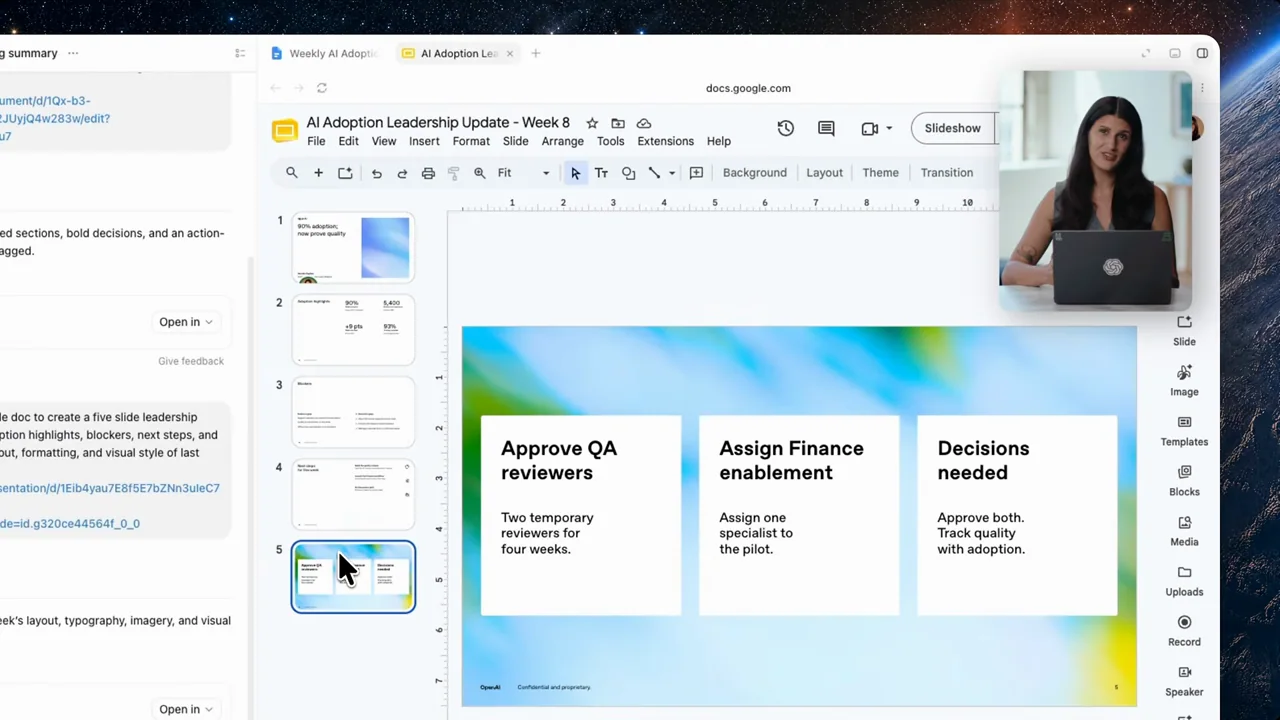
| Shot group 24 ≈ 02:23–02:28 App / browser screenWatch from here ↗ | Sample 02:24.000 | Decision slide A slide uses three cards for requested decisions. | Readable slide-editor result. | Use parallel cards for a small set of actions. |
| Shot group 25 ≈ 02:28–02:34 People / environmentWatch from here ↗ | Sample 02:32.000 | Template introduction The presenter explains reuse after showing the first deck. | Wide and close human views. | Separate one-off output quality from repeatability. |
| Shot group 26 ≈ 02:34–02:46 App / browser screenWatch from here ↗ | Sample 02:42.000 | Document template creation A request extracts the document's structure into a reusable template card. | Prompt-to-template artifact sequence. | Show what structure is being preserved. |
| Shot group 27 ≈ 02:46–02:55 App / browser screenWatch from here ↗ | Sample 02:54.000 | Slide template creation The deck layout is saved as a second reusable template. | Same conversation grammar for a distinct artifact type. | Keep document and slide templates separately identifiable. |
| Shot group 28 ≈ 02:55–03:00 App / browser screenWatch from here ↗ | Sample 02:58.000 | Template reuse request A new task references the saved templates and new meeting material. | Fresh composer makes the changed input clear. | Prove reuse with a new source, not a duplicate output. |
| Shot group 29 ≈ 03:00–03:04 App / browser screenWatch from here ↗ | Sample 03:02.000 | Second summary document A new document opens with the same action-table and question structure. | Matched output framing across runs. | Compare structure while checking that content changed. |
| Shot group 30 ≈ 03:04–03:08 App / browser screenWatch from here ↗ | Sample 03:06.000 | Second slide deck The new deck contains revised metrics and decision cards. | Same template with visibly different content. | Use a second output to demonstrate consistency. |
| Shot group 31 ≈ 03:08–03:14 People / environmentWatch from here ↗ | Sample 03:10.000 | Presenter conclusion The speaker closes after the reused outputs. | Wide human finish. | Keep the user's own ending performance separate. |
| Shot group 32 ≈ 03:14–03:17 Title / identityWatch from here ↗ | Sample 03:16.000 | End identity A white identity ending closes the film. | Minimal final card. | Use original presentation identity. |