Screen tutorial / 01:34 / Published 2024-12-09
How to blend videos with Sora
A butterfly clip and orchid clip are paired, adjusted with an influence-curve control, and followed by a blended result with source references still available.
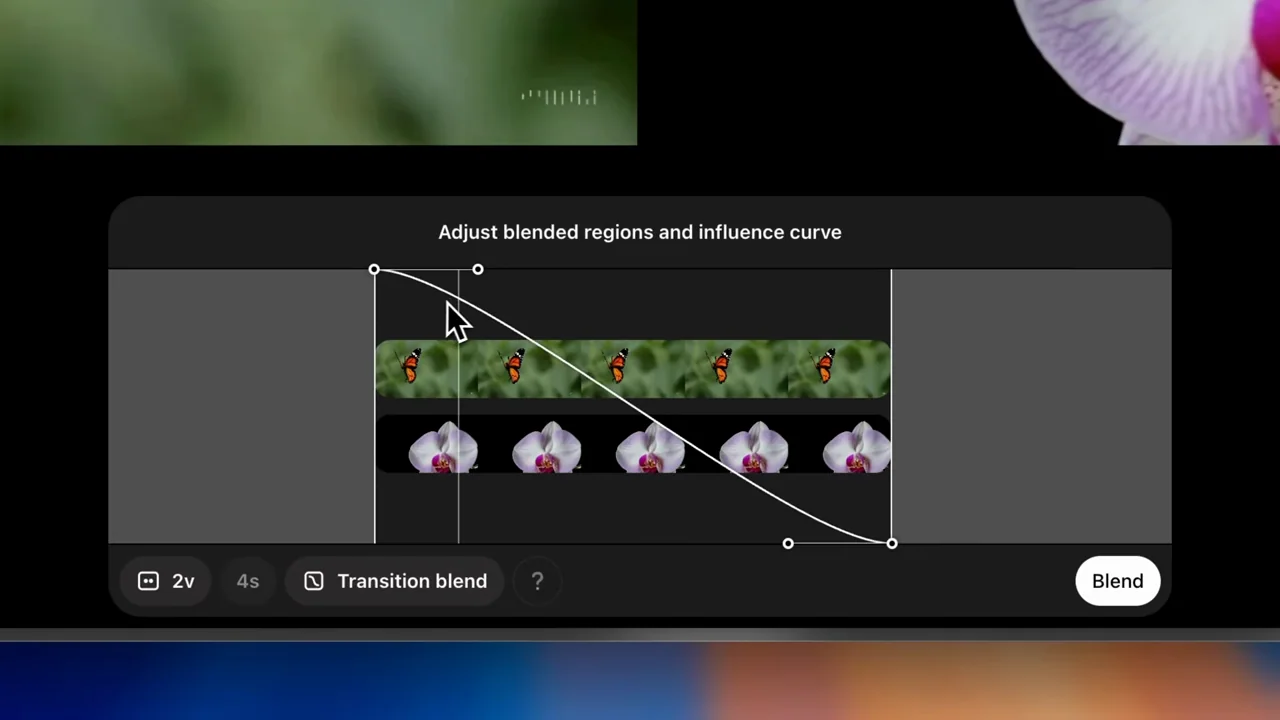
Useful to borrow
Keep both source previews visible around a parameter adjustment.
Do not infer
The result is a generated visual blend, not evidence that a parameter gives deterministic or physically realistic interpolation.
Look closer
- Leave the control close-up as the result starts playing · 01:13–01:18
- Move toward the parameter while retaining its sources · 00:46–00:54
7 shot groups.
Read across from the observed content to its treatment and possible adaptation. Enlarge the frame for detail.
Approximate study intervals; horizontal scrolling reveals all columns on small screens.
| Moment / source | Reference frame | What is on screen | Framing / edit | Useful adaptation |
|---|---|---|---|---|
| Shot group 01 ≈ 00:00–00:32 App / browser screenWatch from here ↗ | Sample 00:16.000 | First source A butterfly clip loops in the dark viewer. | Sustained source context. | Establish the material before introducing the second input. |
| Shot group 02 ≈ 00:32–00:40 App / browser screenWatch from here ↗ | Sample 00:36.000 | Second-source picker A grid of clips opens over the viewer. | Native library overlay. | Show the selection of the second source. |
| Shot group 03 ≈ 00:40–00:48 App / browser screenWatch from here ↗ | Sample 00:44.000 | Paired previews Butterfly and orchid previews sit above a blend control. | Side-by-side source comparison. | Keep both inputs visible. |
| Shot group 04 ≈ 00:48–01:04 App / browser screenWatch from here ↗ | Sample 00:56.000 | Influence curve The view tightens to a curve over two source filmstrips. | Control-detail crop. | Make the parameter and source relationship legible. |
| Shot group 05 ≈ 01:04–01:16 App / browser screenWatch from here ↗ | Sample 01:12.000 | Adjusted blend The whole pair returns before a closer view of the action control. | Context reset and action emphasis. | Avoid losing the source pair during the adjustment. |
| Shot group 06 ≈ 01:16–01:24 App / browser screenWatch from here ↗ | Sample 01:20.000 | Blended playback A butterfly and flower-like form appear together in the output viewer. | Result in the original viewing environment. | Show what the blend actually produced. |
| Shot group 07 ≈ 01:24–01:34 App / browser screenWatch from here ↗ | Sample 01:28.000 | Source-linked result Source thumbnails and tool labels remain beneath larger result playback. | Output detail with provenance affordances. | Keep a route back to the source material. |