Presenter demo / 01:27 / Published 2026-07-23
Work with docs, sheets, and slides in ChatGPT
A document, spreadsheet, and slide deck remain in one artifact workspace. Selection-driven changes link the launch plan, analysis, and final presentation.
Useful to borrow
Establish the three source formats, show a targeted change in each, then prove the presentation can be edited in its destination application.
Do not infer
The inset presenter belongs to the source film. Keep actual document permissions and editability truthful; a rendered preview alone is not evidence of a fully editable file.
Look closer
- Crop to the selected object, then restore context · 00:23–00:27
21 shot groups.
Read across from the observed content to its treatment and possible adaptation. Enlarge the frame for detail.
Approximate study intervals; horizontal scrolling reveals all columns on small screens.
| Moment / source | Reference frame | What is on screen | Framing / edit | Useful adaptation |
|---|---|---|---|---|
| Shot group 01 ≈ 00:00–00:06 People / environmentWatch from here ↗ | Sample 00:02.000 | Presenter and topic title The desk opening carries a large document-and-slide topic overlay. | Physical context before the screen demonstration. | Let the separate talking head introduce the task. |
| Shot group 02 ≈ 00:06–00:08 App / browser screenWatch from here ↗ | Sample 00:06.000 | Document source A launch-plan document opens beside the task conversation. | Full artifact workspace establishes the first source. | Show the original document before modifying it. |
| Shot group 03 ≈ 00:08–00:10 App / browser screenWatch from here ↗ | Sample 00:08.000 | Spreadsheet source A performance spreadsheet replaces the document in the artifact pane. | Same workspace, different file tab. | Keep the common container while identifying another input. |
| Shot group 04 ≈ 00:10–00:12 App / browser screenWatch from here ↗ | Sample 00:10.000 | Slide-template source A slide template appears with its thumbnail rail. | Repeated file-tab grammar. | Identify a template separately from a generated deck. |
| Shot group 05 ≈ 00:12–00:19 App / browser screenWatch from here ↗ | Sample 00:16.000 | Document update request A prompt asks for the plan to incorporate linked discussion decisions. | Composer and source document share a close frame. | Keep the source of a requested update visible. |
| Shot group 06 ≈ 00:19–00:24 App / browser screenWatch from here ↗ | Sample 00:22.000 | Updated plan The document displays revised sections and a milestone table. | Result scroll within the same artifact pane. | Reveal the changed section, not another unchanged cover. |
| Shot group 07 ≈ 00:24–00:28 App / browser screenWatch from here ↗ | Sample 00:26.000 | Table annotation A selected table receives an instruction about deadlines and dependencies. | Native selection bounds the revision target. | Use a precise selection for a precise edit. |
| Shot group 08 ≈ 00:28–00:34 App / browser screenWatch from here ↗ | Sample 00:32.000 | Reorganized table result The revised plan is shown with its updated table structure. | Wider view re-establishes document context. | Compare the structural change in the same document. |
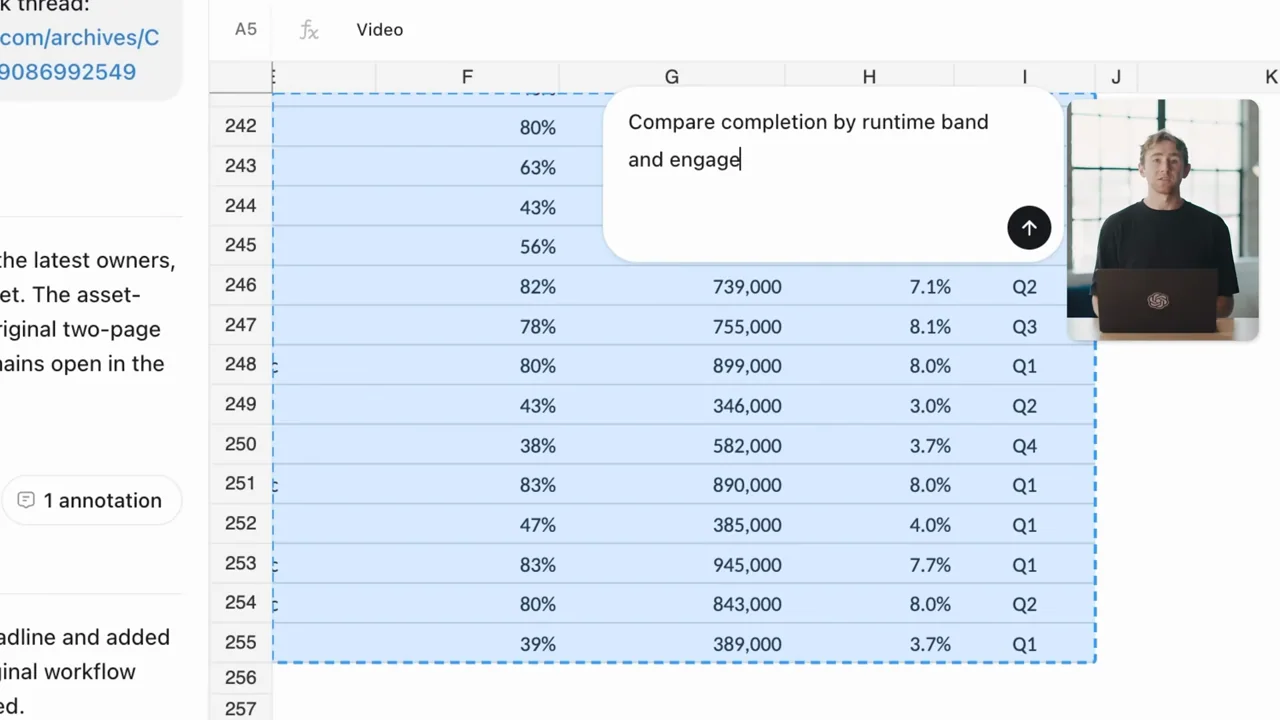
| Shot group 09 ≈ 00:34–00:37 App / browser screenWatch from here ↗ | Sample 00:36.000 | Spreadsheet selection The performance sheet opens and a range is selected. | Crop follows the data region rather than the whole app. | Show which values feed the analysis. |
| Shot group 10 ≈ 00:37–00:43 App / browser screenWatch from here ↗ | Sample 00:40.000 | Spreadsheet analysis instruction An inline prompt requests comparisons over the selected range. | Instruction overlays real selected cells. | Keep the requested comparison adjacent to its inputs. |
| Shot group 11 ≈ 00:43–00:46 App / browser screenWatch from here ↗ | Sample 00:44.000 | Workbook result The conversation reports chart work while the workbook remains open. | Task summary and spreadsheet share the frame. | Distinguish the generated analysis from the original source table. |
| Shot group 12 ≈ 00:46–00:51 App / browser screenWatch from here ↗ | Sample 00:48.000 | Template-based deck request A prompt references the template, updated plan, and charts. | Template preview remains beside the request. | Show all relevant inputs to the assembled presentation. |
| Shot group 13 ≈ 00:51–00:55 App / browser screenWatch from here ↗ | Sample 00:54.000 | Generated deck overview A new cover and message slide appear in the deck viewer. | Thumbnail rail reveals a complete presentation structure. | Inspect an interior page after the cover. |
| Shot group 14 ≈ 00:55–00:58 App / browser screenWatch from here ↗ | Sample 00:56.000 | Generated chart slide A chart page shows the analytical result in presentation form. | Close deck view with page navigation retained. | Prove the chart survived the document-to-deck handoff. |
| Shot group 15 ≈ 00:58–01:03 App / browser screenWatch from here ↗ | Sample 01:00.000 | Reusable-template request A follow-up asks to turn the completed deck into a template. | Composer below the saved presentation artifact. | Separate reuse configuration from the one-off output. |
| Shot group 16 ≈ 01:03–01:07 App / browser screenWatch from here ↗ | Sample 01:04.000 | Template result A reusable template link appears beside the deck. | Conversation and artifact stay together. | Leave a visible reusable handoff, not only a verbal claim. |
| Shot group 17 ≈ 01:07–01:13 App / browser screenWatch from here ↗ | Sample 01:10.000 | PowerPoint editing The deck opens in PowerPoint with a formatting request and changed chart text. | Native editor and assistant pane provide destination context. | Validate editability in the application people will actually use. |
| Shot group 18 ≈ 01:13–01:18 People / environmentWatch from here ↗ | Sample 01:16.000 | Presenter bridge The speaker returns after the external-editor demonstration. | Wide desk shot. | Let the narration summarize while the presentation rests. |
| Shot group 19 ≈ 01:18–01:23 App / browser screenWatch from here ↗ | Sample 01:20.000 | Artifact recap The film revisits the updated document, workbook chart, and deck. | Matched workspace tabs form a short result recap. | Recap distinct outputs rather than replaying the same screen. |
| Shot group 20 ≈ 01:23–01:25 People / environmentWatch from here ↗ | Sample 01:24.000 | Presenter ending A short desk shot closes the spoken demonstration. | Stable human finish. | Keep any wave or pause in the separate supplied recording. |
| Shot group 21 ≈ 01:25–01:27 Title / identityWatch from here ↗ | Sample 01:26.000 | End identity The film resolves to a white identity card. | Clean visual stop. | Use the presentation's own ending. |