Product film / 01:40 / Published 2026-07-09
Meet ChatGPT Work
A product-only film carries one lamp-project story across voice input, connected work, a spreadsheet, imagery, a deck, a chart revision, and mobile follow-up. The coherent task makes many surfaces feel connected.
Useful to borrow
Carry one example through multiple surfaces. Give the result its own framing, then show a targeted revision and the changed result. Use a device change only when the task actually continues there.
Do not infer
The abstract model tile and logo interludes are branding, not UI. Avoid reproducing the source's fixture metrics, app capabilities, or performance implications.
Look closer
- A centered type-on with a temporary color accent · 00:03–00:07
- Switch recording state, then track the growing waveform · 00:14–00:18
- Resolve an image while making room for the next result · 00:44–00:49
- Show the target, the request, and the changed result · 01:04–01:12
23 shot groups.
Read across from the observed content to its treatment and possible adaptation. Enlarge the frame for detail.
Approximate study intervals; horizontal scrolling reveals all columns on small screens.
| Moment / source | Reference frame | What is on screen | Framing / edit | Useful adaptation |
|---|---|---|---|---|
| Shot group 01 ≈ 00:00–00:09 Title / identityWatch from here ↗ | Sample 00:06.000 | Opening sequence Identity and short statements introduce the product. | White typography with restrained accent color. | A few words can establish the topic without a busy title design. |
| Shot group 02 ≈ 00:09–00:11 App / browser screenWatch from here ↗ | Sample 00:10.000 | Composer A large input field introduces the task surface. | Isolated close application fragment. | Start the demo where the user's intent enters. |
| Shot group 03 ≈ 00:11–00:13 Graphic interludeWatch from here ↗ | Sample 00:12.000 | Identity tile An abstract model/identity detail interrupts the composer. | Large sparse graphic. | Keep brand interludes distinct from product evidence. |
| Shot group 04 ≈ 00:13–00:23 App / browser screenWatch from here ↗ | Sample 00:18.000 | Voice input The microphone becomes a waveform, then a completed request. | Close composer details; little surrounding chrome. | Show input state changes without adding a second voice track. |
| Shot group 05 ≈ 00:23–00:31 Title / identityWatch from here ↗ | Sample 00:28.000 | Connected-work statement A chapter statement leads to app-icon activity labels. | Typography and isolated branded activity graphics. | Do not call these isolated marks full application screens. |
| Shot group 06 ≈ 00:31–00:37 App / browser screenWatch from here ↗ | Sample 00:34.000 | Agent activity A framed desktop shows the task progressing with a plan. | Whole-window context on a dark desktop. | Keep one coherent task visible across the sequence. |
| Shot group 07 ≈ 00:37–00:39 App / browser screenWatch from here ↗ | Sample 00:38.000 | Spreadsheet / preview A spreadsheet opens beside the conversation. | Split task-and-artifact view. | Reveal the actual result, not just a completion sentence. |
| Shot group 08 ≈ 00:39–00:41 Title / identityWatch from here ↗ | Sample 00:40.000 | Chapter card A short statement introduces finishing the work. | White reset card. | Mark a meaningful change of stage. |
| Shot group 09 ≈ 00:41–00:45 App / browser screenWatch from here ↗ | Sample 00:44.000 | Composer / follow-up A follow-up asks for visual assets within the same project. | Close composer with the previous artifact at the edge. | Maintain continuity while changing the output type. |
| Shot group 10 ≈ 00:45–00:48 Graphic interludeWatch from here ↗ | Sample 00:46.000 | Image reveal A soft-edged image placeholder resolves toward a result. | Isolated image reveal. | A reveal should lead to a useful artifact, not remain abstract. |
| Shot group 11 ≈ 00:48–00:51 App / browser screenWatch from here ↗ | Sample 00:50.000 | Image / page preview A lamp image and product-page layout appear beside the task. | Whole-window split result view. | Show the image in its intended use. |
| Shot group 12 ≈ 00:51–00:55 App / browser screenWatch from here ↗ | Sample 00:54.000 | Composer / follow-up The next request asks for a deck based on the same work. | Composer detail with existing result context. | Connect artifacts rather than starting a fresh unrelated demo. |
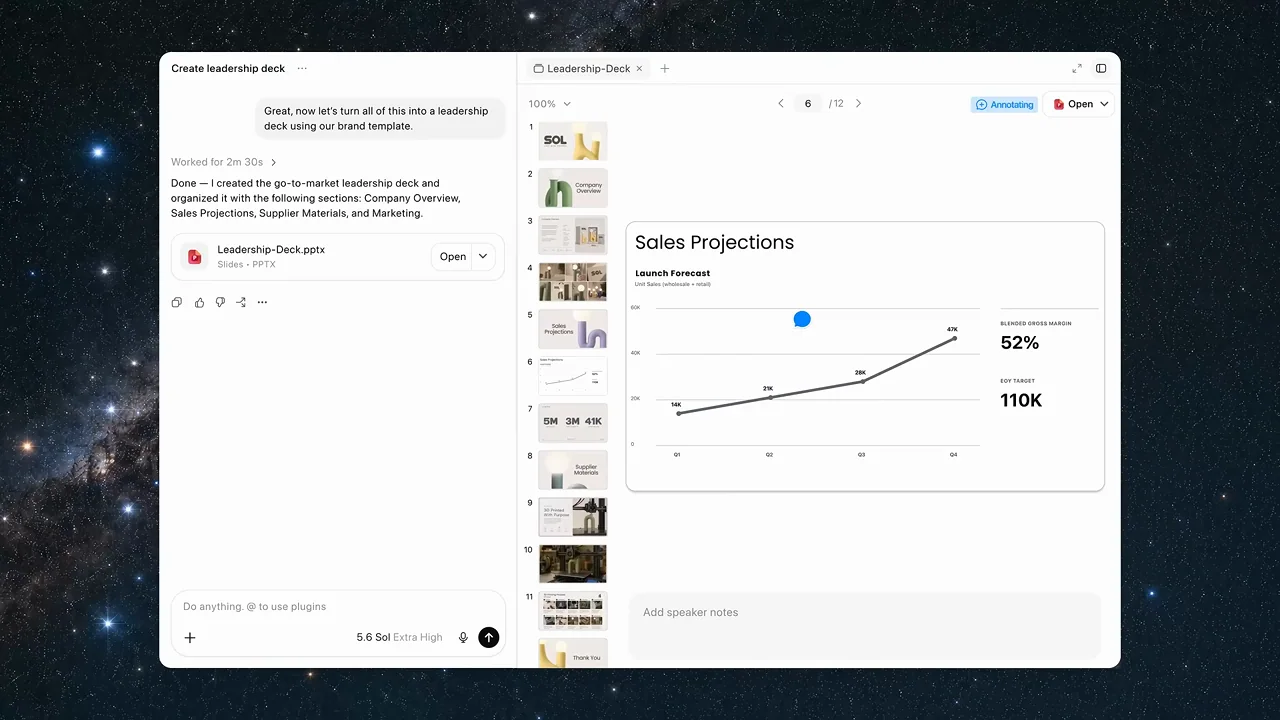
| Shot group 13 ≈ 00:55–00:59 App / browser screenWatch from here ↗ | Sample 00:58.000 | File handoff A completed response exposes a presentation attachment. | Tight result message and file card. | Make the deliverable's existence unambiguous. |
| Shot group 14 ≈ 00:59–01:02 Isolated outputWatch from here ↗ | Sample 01:00.000 | Slide sequence Several deck pages appear without the surrounding application. | Output-only slide overview. | Let viewers see the artifact before its editing controls. |
| Shot group 15 ≈ 01:02–01:04 App / browser screenWatch from here ↗ | Sample 01:04.000 | Presentation editor The deck opens in a split editor view. | Full window with slide strip and task context. | Orient viewers before a selected-region edit. |
| Shot group 16 ≈ 01:04–01:07 App / browser screenWatch from here ↗ | Sample 01:06.000 | Selection / edit prompt A selected chart region carries a contextual revision request. | Close chart crop with an overlaid edit control. | Put the requested change beside the exact thing being changed. |
| Shot group 17 ≈ 01:07–01:13 App / browser screenWatch from here ↗ | Sample 01:12.000 | Presentation editor The full editor returns and the chart changes. | Wide context followed by a visible before/after result. | Hold the changed chart, not just the edit command. |
| Shot group 18 ≈ 01:13–01:15 Title / identityWatch from here ↗ | Sample 01:14.000 | Chapter card A short task-completion statement bridges to mobile. | White title reset. | Use a clear transition before a device change. |
| Shot group 19 ≈ 01:15–01:21 App / browser screenWatch from here ↗ | Sample 01:18.000 | Mobile task conversation A phone shows a sharing request and its response. | Centered device on white. | Only change device when it advances the same task. |
| Shot group 20 ≈ 01:21–01:25 App / browser screenWatch from here ↗ | Sample 01:24.000 | Mobile scheduled tasks The phone displays scheduled work and a feedback notification. | Stable device with state changes. | Show follow-through rather than another generic app launch. |
| Shot group 21 ≈ 01:25–01:28 App / browser screenWatch from here ↗ | Sample 01:28.000 | Mobile result A task update includes a revised presentation attachment. | Close mobile content without the whole device. | Keep the latest deliverable visible. |
| Shot group 22 ≈ 01:28–01:31 Isolated outputWatch from here ↗ | Sample 01:30.000 | Revised slides The updated deck pages appear as an output sequence. | Several isolated slide thumbnails. | Close the loop on the requested change. |
| Shot group 23 ≈ 01:31–01:40 Title / identityWatch from here ↗ | Sample 01:38.000 | End sequence A closing statement, small graphic, product name, and source mark resolve. | Return to sparse white-field branding. | Choose a simpler original ending for the all-hands handoff. |