Presenter demo / 02:13 / Published 2026-06-05
Introducing Sites in Codex
A presenter-led tour puts finished interactive sites near the start, then shows several different output layouts and finally sharing controls. The strongest lesson is demonstrating what was built, not merely showing the request.
Useful to borrow
Show a useful finished artifact early. Scroll a meaningful region, change a visible control, and include a share or access state when it is part of the story.
Do not infer
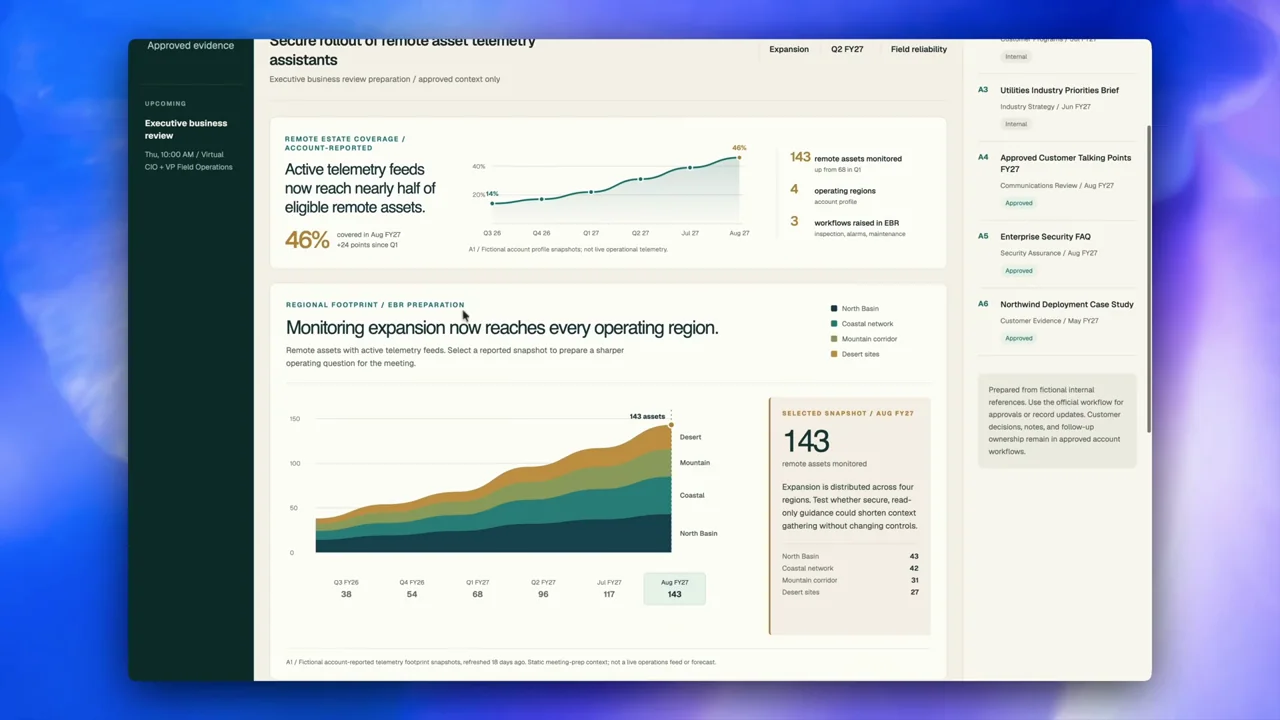
The example dashboards are output sites, not the standard Codex shell. Their metrics and product-looking controls are demo content, not your product features or business results.
15 shot groups.
Read across from the observed content to its treatment and possible adaptation. Enlarge the frame for detail.
Approximate study intervals; horizontal scrolling reveals all columns on small screens.
| Moment / source | Reference frame | What is on screen | Framing / edit | Useful adaptation |
|---|---|---|---|---|
| Shot group 01 ≈ 00:00–00:03 People / environmentWatch from here ↗ | Sample 00:02.000 | Presenter A seated presenter opens the tour. | Medium camera shot. | Keep the user in the separate OBS asset. |
| Shot group 02 ≈ 00:03–00:07 App / browser screenWatch from here ↗ | Sample 00:06.000 | Composer / site task A Sites-tagged request is entered. | Close composer framing. | Show the task before revealing the artifact. |
| Shot group 03 ≈ 00:07–00:09 App / browser screenWatch from here ↗ | Sample 00:08.000 | Agent result / link A task response exposes the built site's link. | Whole task window. | Show the handoff from agent to output. |
| Shot group 04 ≈ 00:09–00:14 App / browser screenWatch from here ↗ | Sample 00:12.000 | Generated site / dashboard A forecasting dashboard is opened and scrolled. | Browser-contained output with charts and tables. | Prove that a useful artifact exists. |
| Shot group 05 ≈ 00:14–00:43 People / environmentWatch from here ↗ | Sample 00:28.000 | Presenter The presenter explains the capability between examples. | Long camera-led explanation with several cuts. | Do not infer demo timing from this explanation interval. |
| Shot group 06 ≈ 00:43–00:57 App / browser screenWatch from here ↗ | Sample 00:48.000 | Generated site / dashboard An energy account dashboard scrolls and changes visible data states. | Whole browser and closer chart/layout crops. | Animate the real result, not an invented dashboard. |
| Shot group 07 ≈ 00:57–01:02 People / environmentWatch from here ↗ | Sample 01:00.000 | Presenter The presenter bridges to another output. | Medium framing. | A chapter or held result can serve this beat in the companion. |
| Shot group 08 ≈ 01:02–01:11 App / browser screenWatch from here ↗ | Sample 01:08.000 | Generated site / event planner An event site changes selected sessions and detail content. | Stable browser framing with a changing central panel. | Show one interaction so the output reads as usable software. |
| Shot group 09 ≈ 01:11–01:21 People / environmentWatch from here ↗ | Sample 01:16.000 | Presenter Another camera segment separates the examples. | Medium coverage. | Use only as a pacing contrast. |
| Shot group 10 ≈ 01:21–01:33 App / browser screenWatch from here ↗ | Sample 01:28.000 | Generated site / memo A memo site scrolls through analysis, a chart, and review details. | Readable document-like layout inside browser context. | A finished document can be a product-demo result. |
| Shot group 11 ≈ 01:33–01:56 People / environmentWatch from here ↗ | Sample 01:44.000 | Presenter The presenter explains access and use before the final controls. | Camera-led interval. | Let the recording determine the length of this explanation. |
| Shot group 12 ≈ 01:56–02:01 App / browser screenWatch from here ↗ | Sample 01:58.000 | Site settings A site's settings expose sharing, secrets, and environment areas. | Whole application; no actual secret values need to be reproduced. | Use safe fixture data and keep private values out of captures. |
| Shot group 13 ≈ 02:01–02:04 App / browser screenWatch from here ↗ | Sample 02:04.000 | Sharing dialog A share dialog appears over the site list. | Centered modal with surrounding context. | End the workflow on its delivery state. |
| Shot group 14 ≈ 02:04–02:10 People / environmentWatch from here ↗ | Sample 02:08.000 | Presenter The presenter closes the tour. | Stable camera view. | The talking head can continue after the presentation's visual finish. |
| Shot group 15 ≈ 02:10–02:13 Title / identityWatch from here ↗ | Sample 02:12.000 | End card A source mark and destination finish the film. | Quiet white end slate. | Leave a clear endpoint on the presentation timeline. |